 Blog
Blog
Best Lab Notebook Apps for iPhone & iPad (2026)
Why Your iPhone Might Be the Best Lab Notebook You're Not Using
It's 4:40 p.m. An assay is running, a timer just went off, and a critical observation happens while both hands are busy. At such moments, lab documentation breaks down. Scientists still end up dictating into generic voice memos, scribbling on tape, or trusting memory for the write-up later, and that's usually where timing, sequence, deviations, and context get flattened into something cleaner than what occurred.
Moving from paper to digital helps, but it doesn't solve the hardest part. Harvard Medical School's guidance on electronic lab notebooks makes the bigger point clearly: digital notebooks improve searchability, data security, audit trails, and data management practices, but its primary value depends on getting protocols, observations, notes, and other data into the system in the first place through computers or mobile devices Harvard Medical School ELN guidance. If entry still happens after the fact, the friction remains.
This guide looks at the best lab notebook app options for iPhone and iPad with one practical question in mind. Which tools help scientists capture what happened, when it happened, without derailing bench work?
Table of Contents
- 1. Verbex (our app)
- 2. LabArchives ELN by Dotmatics
- 3. Benchling Notebook
- 4. RSpace Research Space
- 5. SciNote ELN
- 6. Labguru BioData Inc.
- 7. Labstep
- Top 7 Lab Notebook Apps Comparison
- From Capture to Context Choosing the Right Documentation Workflow
1. Verbex (our app)
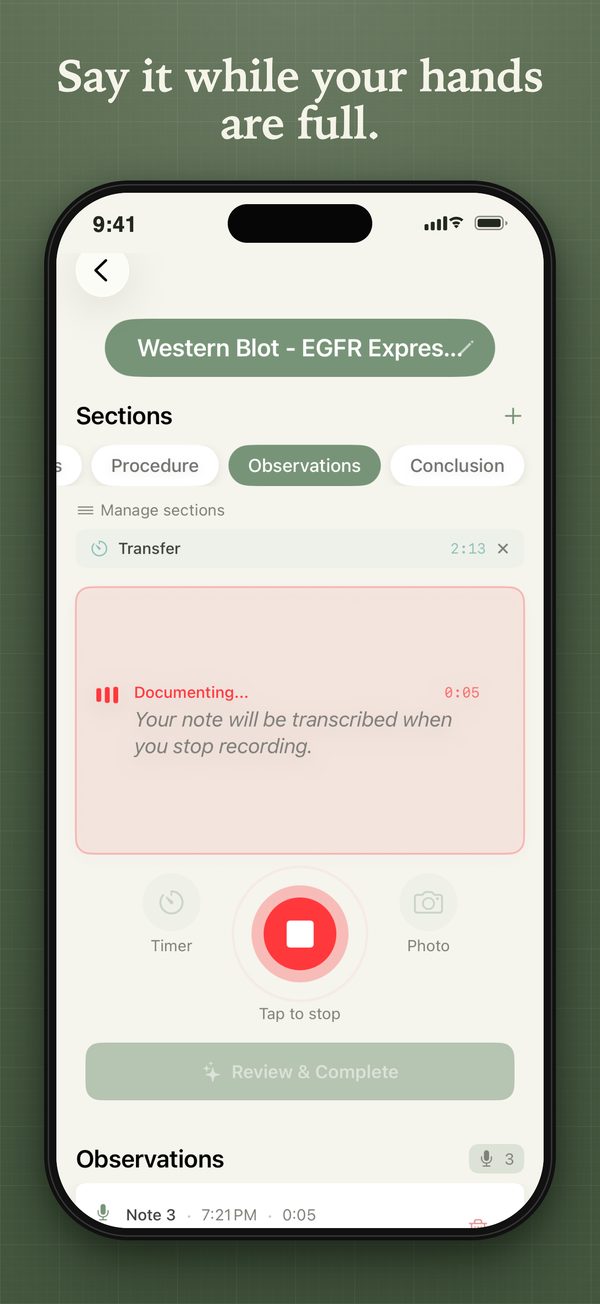
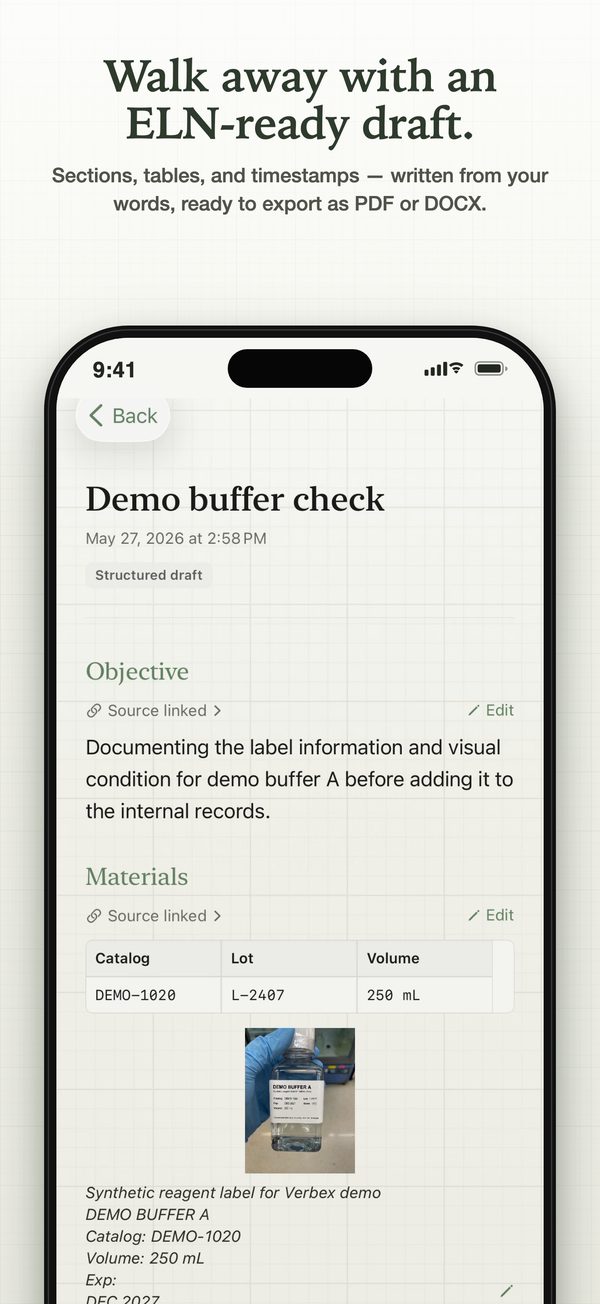
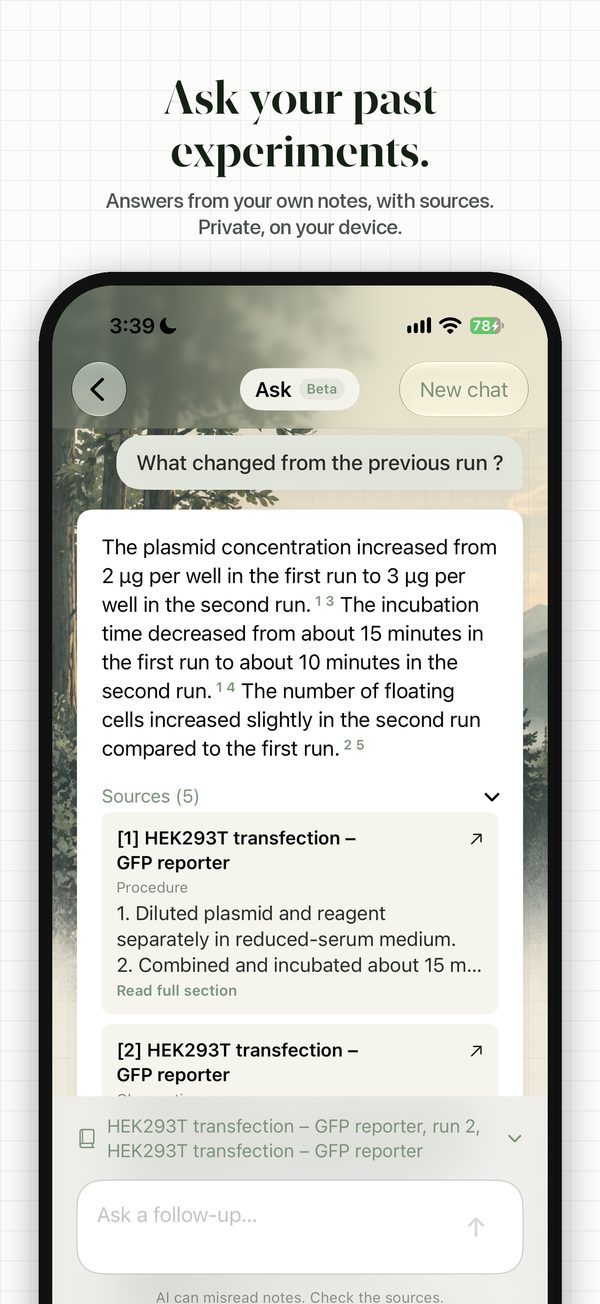
A bench scientist has one free moment to record what just happened. Gloves are on, a centrifuge is running, and the observation matters now, not after lunch when memory has already flattened the details. That is the gap Verbex is built to address. It is optimized for iPhone, requires iOS 26 or later, and is also usable on compatible iPads.
Verbex is a private, on-device Voice-to-ELN app for iOS. It lets scientists speak notes during the experiment, then organize those captures into structured, reviewable records. According to its App Store listing, recordings are timestamped at the moment of capture, which is exactly what contemporaneous documentation should preserve.
Why it stands out on iPhone
For bench capture, the practical distinction is simple. Some apps work well once the experiment is over and someone sits down to write. Verbex is built for the actual moment of capture.
That changes the workflow. Instead of dumping a raw transcript into a notes field, scientists can sort spoken content into sections such as Objective, Materials, Procedure, Observations, Results, or custom headings, then review and clean up the record before export. The output is closer to something a lab can archive, share internally, or move into an existing ELN.
That matters more than many ELN comparisons admit. Generic mobile note tools can store words. Bench documentation has to preserve timing, context, and enough structure that the record still makes sense a week later. For a broader look at that problem, this review of electronic lab notebook software for bench capture is useful background.
Privacy is another strong point. Verbex is designed around on-device processing, which is a sensible choice for unpublished methods, internal protocols, and any setting where pushing raw experimental notes into a general cloud workflow creates unnecessary risk.
Best fit and trade-offs
Verbex fits labs where the main failure point is capture at the bench. That includes wet-lab biology, chemistry, QC, and small biotech teams that already know post hoc writeups are where details get lost.
The trade-off is equally clear. Verbex is not trying to replace a full institutional ELN with procurement controls, broad integrations, and formal admin layers. It is strongest as the front end of documentation, especially for scientists who need to capture observations on iPhone or iPad while the work is still happening.
Pros and cons are straightforward.
Strongest use case: Real-time Voice-to-ELN capture helps preserve observations while they are still fresh and tied to the experiment itself.
Good fit for sensitive work: On-device processing supports labs that are cautious about sending raw bench notes to external systems.
Better record discipline: Scientists review and finalize the entry after capture, which is a more defensible workflow than relying on memory alone.
Main limitation: Verbex is a capture companion rather than a full institutional ELN. Subscriptions cost US$2.99 weekly, US$7.99 monthly or US$49.99 annually after a 14-day free trial for eligible new subscribers. Direct ELN integrations are not currently available.
Operational reality: Voice capture still needs human review, especially with technical terminology, background noise, or rushed speech.
2. LabArchives ELN by Dotmatics

LabArchives is one of the safest picks for labs that want a recognizable ELN with wide academic familiarity. It's cloud-based, mature, and much closer to a traditional electronic notebook than a voice-first capture tool.
Adoption is one reason it stays on shortlists. A published comparison notes that LabArchives is trusted by over 650 research organizations globally, including the NIH, and also cites a user survey where LabArchives users rated their tool higher than non-users rated theirs for keeping a complete research record, producing a long-term archive, and sharing findings with collaborators LabArchives adoption and user survey summary.
Where it works well
For iPhone and iPad users, LabArchives works best as a companion to an established ELN workflow. It gives scientists searchable records, templates, collaboration features, and audit trails. Those are the basics many labs need once a team has already agreed that digital notebooks are the standard.
It's also easier to justify to institutions because it looks and behaves like what people expect an ELN to be. That matters in shared academic environments where onboarding undergraduates, postdocs, and staff quickly is part of the job.
A broader overview of what an electronic lab notebook does in practice helps explain why LabArchives remains common. It handles organization and archiving well, especially when a lab wants a structured replacement for paper.
Where it falls short on iPhone and iPad
The weakness is the same one many ELNs have on mobile. LabArchives is useful once a scientist is ready to enter or clean up a record. It's less compelling for the exact second a visual change, deviation, or timing-dependent observation happens during active bench work.
LabArchives is a strong ELN. It isn't a specialized bench capture tool.
That distinction matters. For labs that mostly document after the run, that's fine. For labs trying to reduce delayed transcription, it leaves the original friction in place.
Its public-facing strengths and limitations are clear.
- Best for: Straightforward ELN adoption, searchable records, templates, and collaboration.
- Good institutional fit: Familiar in academia and government settings.
- Main drawback on mobile: Better for entry and review than contemporaneous spoken bench capture.
Scientists can learn more at the LabArchives website.
3. Benchling Notebook
Benchling sits in a different category from lightweight notebook apps. It's a broader R&D platform, and that's both its advantage and its cost. Teams don't choose Benchling just for notes. They choose it because notebook entries can connect to samples, inventory, protocols, registries, and a wider data model.
That broader position is reflected in market commentary as well. One ranking places Benchling in the top spot for best lab notes software in 2026 and describes its strength as transforming unstructured notes into analysis-ready data while supporting real-time collaboration and team alignment Benchling ranking overview.
Why teams choose it
Benchling is a good fit when the notebook can't live alone. If a team wants one environment for experimental records, biological design work, connected sample information, and workflow continuity, Benchling makes sense. That's especially true in biotech settings where documentation is only one layer of a larger R&D process.
It also appeals to groups that want the notebook tied to the rest of the scientific stack rather than treated as an isolated archive. In that context, the notebook becomes one interface in a connected system.
What to know before using it as a mobile notebook
Benchling on iPhone and iPad is most useful when mobile access extends a desktop-centered system. It's not the first recommendation for a scientist whose main pain point is speaking observations in real time during wet-lab execution.
Bench insight: Benchling is strongest when documentation needs to connect to the rest of the data lifecycle, not when a lab only needs the fastest possible capture at the bench.
That's the trade-off. Benchling can do much more than note-taking, but that scale can feel heavier than necessary for small groups or individual researchers who primarily need the best lab notebook app for quick, faithful mobile documentation.
It's also worth keeping categories separate. A lot of confusion in software buying happens because teams compare notebooks, LIMS, and hybrid platforms as if they solve the same problem. This guide to ELN vs LIMS is useful for that distinction.
Scientists can explore the platform at the Benchling website.
4. RSpace Research Space

RSpace appeals to a different kind of buyer. It's attractive to institutions that care about open-source foundations, research data management, and deployment flexibility, not just a polished front-end notebook.
That makes it more interesting than many generic ELNs. Some labs want an app. Others want a system they can deploy with more control, especially when data governance, local hosting options, or institutional standards shape the purchase.
What makes it different
RSpace combines ELN functions with broader research data management concerns. It's better suited to organizations that think about FAIR data workflows, institutional integration, and long-term control from the start.
For chemistry-heavy or mixed research environments, that can be useful. The platform's support for chemistry tooling and structure-oriented work also gives it a stronger scientific identity than a plain text notebook.
The practical compromise
On iPhone and iPad, RSpace is best seen as a mobile access point into an institutional ELN rather than a purpose-built mobile capture app. It supports serious documentation workflows, but it doesn't center the specific problem of contemporaneous spoken bench notes.
That means it can work well for reviewing, referencing, or entering structured information on mobile, especially in teams with IT support and clear governance. It's less appealing for researchers who want a minimal-friction tool at the exact moment of observation.
The trade-off is familiar.
- Why choose it: Open-source roots, flexible deployment, and stronger alignment with institutional data strategies.
- Why hesitate: More configuration and IT involvement than plug-and-play mobile notebook tools.
- Best user: Universities, institutes, and teams that need flexibility more than simplicity.
More detail is available at the RSpace website.
5. SciNote ELN

SciNote is often easier to understand than some larger platforms. It presents itself as a practical ELN with task-based workflows, inventory support, APIs, and options for regulated environments. For many small and mid-sized labs, that's a sensible middle ground.
There's also a broader argument in its favor. SciNote cites perception research suggesting that the transition from paper to ELNs is widely seen as a suitable replacement, and notes that the ELN market is projected to keep expanding through 2030 as labs prioritize data organization, security, and retrieval for later use or collaboration SciNote ELN perception study summary.
Where SciNote makes sense
SciNote works well when a lab wants a conventional ELN that still feels approachable. It covers the expected base layer. Audit trails, signatures, permissions, and workflow structure. That's enough for many teams that want to get organized without buying a much larger informatics stack.
Its task orientation can also help labs that struggle with inconsistent execution. A notebook isn't only about recording what happened. It also shapes how work gets carried out.
What to watch on mobile
The mobile question is the same one that divides many ELNs from newer Voice-to-ELN tools. SciNote helps once a scientist is inside the system. It doesn't specifically solve hands-busy, in-the-moment voice capture at the bench.
That doesn't make it a poor choice. It just means it's better for structured ELN workflows than for preserving fleeting bench observations during active work.
- Strong fit: Small-to-mid labs that want modular ELN capabilities and a clearer path toward regulated documentation practices.
- Less ideal fit: Scientists whose biggest problem is immediate capture while running experiments.
- Buying note: Premium and validated configurations usually require direct sales engagement.
The platform is available through the SciNote website.
6. Labguru BioData Inc.

Labguru takes the all-in-one route. It combines ELN, LIMS, inventory, equipment scheduling, dashboards, and related controls in one platform. Some labs love that because it reduces tool sprawl. Others end up buying more system than they need.
That difference matters a lot on iPhone and iPad. A broad platform can be powerful, but mobile usability tends to drop as the scope expands. What feels efficient in procurement can feel heavy in daily bench work.
Why some labs prefer an all-in-one stack
Labguru is a serious option for labs that want documentation tied closely to operations. If the same team manages records, inventory, requests, and equipment in one place, the appeal is obvious. It can support cleaner traceability across the larger workflow.
Its compliance-oriented language and data integrity framing also make it easier to discuss in regulated or audit-conscious settings, as long as buyers stay realistic about validation and implementation work.
A broad platform helps when the notebook is only one part of a tightly managed process. It slows things down when the immediate problem is getting observations captured before they disappear.
Where that can become too much
For a scientist looking for the best lab notebook app on an iPad during active bench work, Labguru may feel like entering a lab management system through a smaller screen. That's useful for lookup, approvals, and connected records. It isn't the same as low-friction contemporaneous documentation.
Labs should choose Labguru when they want platform consolidation, not just a better note-taking experience.
- Best fit: Teams that want ELN, LIMS, and inventory under one vendor.
- Main concern: Administrative breadth can add overhead for groups that mainly need a notebook.
- Mobile reality: Good as part of a larger workflow. Less elegant for fast bench capture.
Scientists can review the platform at the Labguru website.
7. Labstep

Labstep is easiest to understand if it's treated as protocol-first software. It's designed around stepwise execution, structured methods, and controls that make procedures easier to follow, lock, witness, and sign. That gives it a different feel from notebooks built primarily around freeform entries.
For academic groups, that can be appealing because protocol discipline is often the core problem. The issue isn't only where the notes go. It's that people run the same method in slightly different ways and only discover the drift later.
Its strongest use case
Labstep works well for teams that want the notebook tightly coupled to protocol execution. If a lab values stepwise structure, role control, and process consistency, Labstep has a clear identity.
That makes it attractive for training environments too. A protocol-centric system can reduce ambiguity for students, new hires, and shared lab users who need stronger procedural guidance.
The mobile reality
On iPhone and iPad, Labstep can be useful at the bench because protocol access is naturally mobile. But that doesn't automatically make it the best lab notebook app for contemporaneous capture. Following a protocol on a tablet is one thing. Capturing rich observations mid-experiment with minimal friction is another.
The distinction within this article is of utmost importance. Some tools are excellent for post-hoc entry. Some are excellent for structured execution. A smaller set is built around preserving the scientific moment itself.
- Why choose it: Strong protocol-first design and structured execution at the bench.
- Why pause: Advanced admin capabilities and industry tiers usually require higher-level plans.
- Best user: Academic labs and process-oriented teams that want more structure in daily execution.
Scientists can evaluate it at the Labstep website.
Top 7 Lab Notebook Apps Comparison
| Product | Implementation complexity | Resource requirements | Expected outcomes | Ideal use cases | Key advantages |
|---|---|---|---|---|---|
| Verbex | Low–Moderate, app-based, device deployment per user | Modern mobile/tablet with on-device processing; minimal IT; vendor engagement for enterprise | Faster, in‑situ ELN-ready notes with preserved experimental detail | Bench scientists, wet labs, chemists, grad students, QC | Real-time voice capture, local-first privacy, organizes into scientific sections |
| LabArchives ELN (Dotmatics) | Low, mature SaaS with straightforward onboarding | Subscription tiers; admin for integrations and higher-tier features | Predictable ELN workflows with compliance controls | Academia, government, labs needing clear pricing and compliance | Transparent pricing, SOC 2 and regulatory controls, optional inventory/scheduler |
| Benchling Notebook | High, platform-level deployment and integrations | Cloud subscription, IT for integrations, training; sales-led pricing | Integrated R&D records linked to samples, registry and automation | Teams needing end-to-end R&D platform and instrument connectivity | Unified platform, Benchling AI, strong automation/instrument integrations |
| RSpace (Research Space) | Moderate–High, configurable, open-source or hosted options | On‑prem/private cloud or hosted; IT resources for deployment; licensing | FAIR-aligned data management with compliance-ready features | Institutions prioritizing open-source, private deployment, FAIR practices | Open-source codebase, deployment flexibility, public pricing and compliance certifications |
| SciNote ELN | Moderate, user-friendly with optional validated setups | Subscription; premium/validated plans may need vendor services and admin | Regulated-ready ELN with audit trails, signatures and APIs | Small-to-mid labs needing modular compliance and validated options | Validated configurations for 21 CFR Part 11/GxP, clear documentation and API connectivity |
| Labguru (BioData Inc.) | High, full ELN+LIMS implementation and configuration | Sales-led pricing, implementation support, IT/admin for LIMS features | Consolidated ELN+LIMS workflows, validated/cloud deployment options | Labs seeking one-vendor ELN+LIMS with compliance and scheduling | Unified ELN+LIMS+inventory, documented 21 CFR Part 11 and ISO 27001 posture |
| Labstep | Low–Moderate, protocol-centric, easy academic adoption | Free academic tier; paid tiers for groups/SSO; modest admin | Stepwise, execution-focused experiments with compliance controls | Academic labs and teams that value structured protocol execution | Free academic option, protocol-first design, execution controls and 2FA signatures |
From Capture to Context Choosing the Right Documentation Workflow
A bench scientist finishes a long tissue culture day, sits down at an iPad, and tries to reconstruct what happened at 10:40 a.m. Was the media already cloudy before the wash. Did the sample warm up too long on the bench. Which tube had the faint precipitate, and when did that first show up. By that point, the experiment is over and the record is already weaker.
That is the primary filter for iPhone and iPad notebook apps. The useful distinction is not just feature depth. It is whether the app helps with contemporaneous capture, or mainly helps once someone has time to type, organize, review, and sign off.
Several tools in this list are better in that second category. LabArchives works well for structured entry and sharing after the fact. Benchling, Labguru, and RSpace make more sense when the notebook sits inside a broader research or operations stack. Labstep is strongest if the lab wants tighter protocol execution. SciNote sits in the middle and is often easier to adopt without rebuilding everything at once.
The difficult part is earlier. Good records depend on what gets captured while the work is still happening. Timing, deviations, visual changes, uncertainty, sample condition, and small judgment calls fade fast. Once that context is gone, a polished entry can still be incomplete.
Voice-to-ELN changes the workflow at that point. Instead of asking researchers to reconstruct the day later, it lets them document observations during the experiment and clean the record afterward. On iPhone and iPad, that matters because the device is already in the room, often in a pocket or on a bench stand. The limitation is usually not access to hardware. It is whether the software matches the stop-start, hands-busy reality of lab work.
Verbex is included here for that reason. It is a private, on-device Voice-to-ELN app built for scientific note capture on iPhone and iPad. The practical value is straightforward: speak the observation when it happens, convert it into organized experimental notes, then review and edit before anything becomes part of the final record. That approach suits labs that care about preserving the original sequence of events without handing sensitive bench notes to a generic transcription tool.
For choosing among these apps, use a simple test. If the lab needs a full ELN or ELN plus LIMS environment, pick the platform that fits the group's compliance, collaboration, and administrative load. If the main problem is losing detail between the bench and the write-up, choose a workflow that captures the scientific moment first and structures it second. Teams also working through figure creation and documentation presentation may find this guide to alternatives to Biorender for researchers useful.
Scientists tired of delayed write-ups and fragmented bench notes can explore Verbex as a practical Voice-to-ELN workflow for iPhone. It helps capture experiments as they happen, preserve context, keep processing on device, and leave the scientist in control of the final record.