 Blog
Blog
Laboratory Stock Management Software: A Practical Guide
By Multimod Labs.
The bad moment is familiar. A scientist needs a reagent now, the freezer map is outdated, the lot number is on one label, the expiry date is on another, and nobody trusts the spreadsheet enough to act fast. Laboratory stock management software exists to collapse that mess into one controlled record for item identity, quantity, location, lot, and expiry, but the right choice depends on how the bench works, not on the longest feature list.
The key boundary matters. Stock software manages materials and replenishment, while ELNs capture experiments, LIMS handle samples and workflows, QMS covers quality controls, and experimental capture tools help scientists record what happened at the bench. This guide compares practical options, starting with a spreadsheet-based route that can still make sense for small teams, then moving through the decisions that separate a usable system from a shelf full of ignored alerts.
Table of Contents
- 1. Lab Inventory System Excel inventory workbooks
- 2. Dedicated lab inventory platforms
- 3. Inventory systems with workflow discipline
- 4. Cloud-based inventory with stronger user satisfaction
- 5. Laboratory inventory tools with stronger bench usability
- 6. Systems that keep inventory separate from documentation
- 7. How to choose without overbuying
- Single-Resource Comparison: Excel Lab Inventory
- Choose the Smallest System That Stays Accurate
1. Lab Inventory System Excel inventory workbooks
A spreadsheet is still the first serious answer for a lot of small labs. The attraction is obvious, it is familiar, cheap to adopt, and fast to tailor when the inventory problem is mainly chemical bottles, consumables, freezer boxes, and solution prep rather than multi-site procurement.
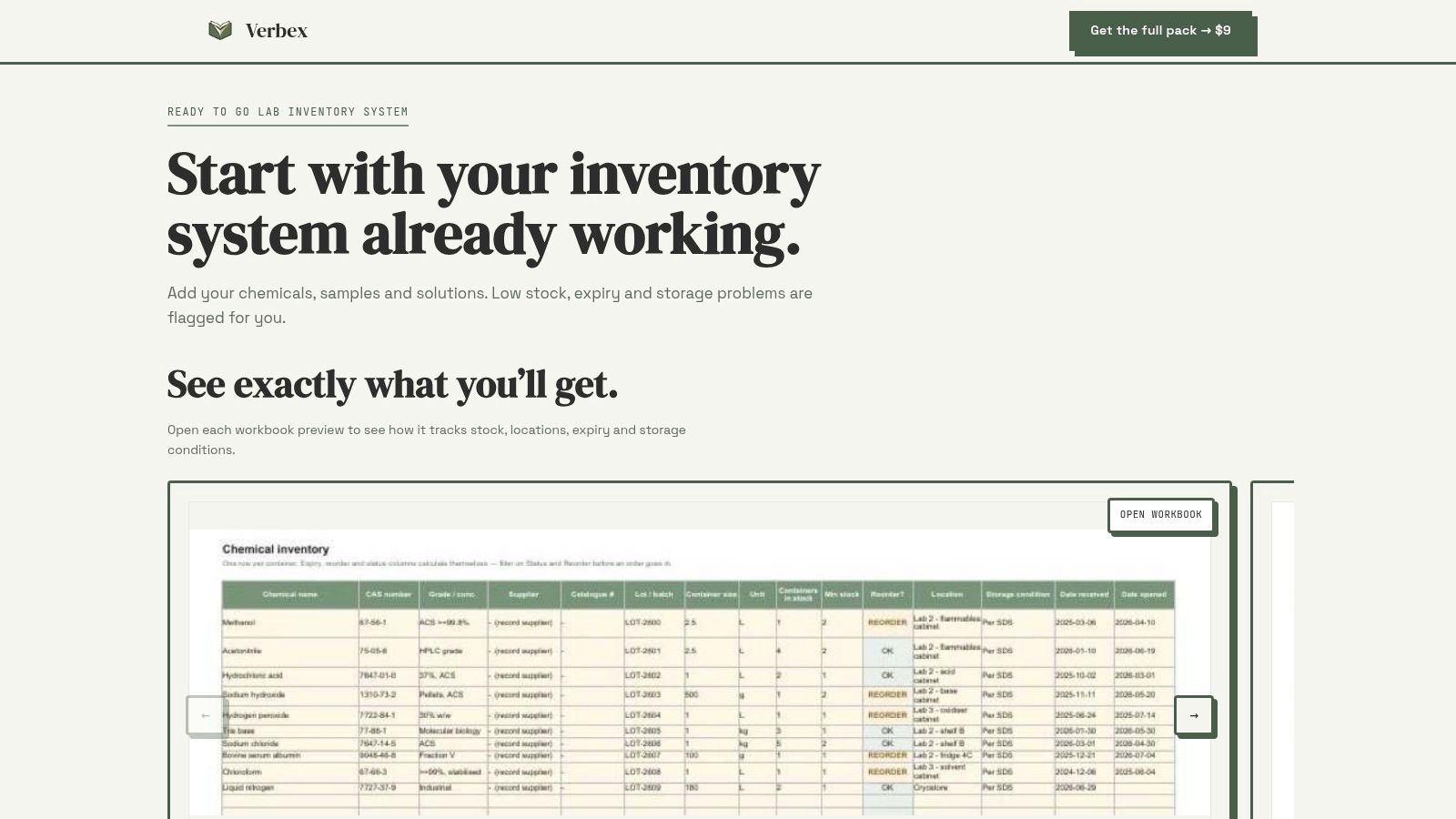
Lab Inventory System (Excel inventory workbooks) is the simplest paid option in this list, and that simplicity is the point. It bundles chemical inventory and SDS tracking, sample and freezer box maps, solution preparation, and storage monitoring, with expiry and low-stock flags as part of the broader Lab Documentation Pack for one lab team.
Where spreadsheets work well
For a small academic or startup bench, a workbook can cover the daily questions that matter most. Who has the aliquot, what freezer is it in, when does it expire, and what needs to be reordered before Friday? The best spreadsheet setups are narrow, explicit, and owned by one person or one clearly defined group.
Practical rule: if the team can still explain the whole inventory process on one whiteboard, a workbook may be enough.
The weakness is coordination. Once several people edit at different times, duplication and stale records appear quickly, and the sheet starts reflecting how people hope the freezer looks instead of what is there. A workbook also works best when controls are visible, which means clear naming rules, a single source of truth, and a defined review rhythm.
What to check before choosing it
A spreadsheet-based approach only holds up if the lab can answer a few practical questions with confidence. Can the team keep lot numbers attached to items after transfers, re-labels, or split stocks? Can someone search by storage location without guessing the naming convention? Can expired or soon-to-expire items be found in seconds instead of during a bench interruption?
A spreadsheet fails quietly before it fails dramatically. The warning sign is not a crash, it is when people start keeping shadow lists on paper, chat, or local files.
For very small teams, that still may be acceptable. For growing groups, it becomes a coordination tax. If the lab needs shared access, stronger auditability, or more frequent movement between rooms and freezers, dedicated software starts making more sense than a workbook, even when the workbook is well built.
Why this option stays on the list
The appeal of a spreadsheet is not that it is fancy, it is that it forces discipline. A good workbook can reveal whether the team really knows what it stores, how often items move, and whether expiry handling is realistic. If the spreadsheet falls apart during a pilot, the lab has learned something useful before buying more software than it can use.
For teams that want a low-cost inventory baseline before moving further, the internal chemical inventory template guide is a useful implementation companion. It helps define the fields and review cadence that make a workbook usable instead of decorative.
2. Dedicated lab inventory platforms
Dedicated platforms exist for labs that have outgrown manual trackers, even if they're not ready to force everything into a full LIMS. The strongest versions centralize materials, location data, and replenishment in one record, which is exactly what spreadsheet users usually wish they had after the second freezer audit.
The clearest market signal is that this category is no longer niche. One estimate valued the global market at USD 2.58 billion in 2026 and projected it to reach USD 5.31 billion by 2034, with a 9.43% CAGR (market estimate). Another view placed the market at USD 1.06 billion in 2025 and said cloud-based solutions were USD 752.52 million, or 71.14% of that market in the same year (market view).
What these systems usually do better
A proper inventory platform usually gives the lab a single record for reagents, chemicals, samples, consumables, and equipment, along with who is using them, where they're stored, and when they expire or need replenishment (materials list and controls). Many systems also add barcode or QR scanning, low-stock alerts, audit logs, and role-based access controls.
That mix matters because the pain is not just stockouts. The pain is record drift. If one person updates the file and another person keeps using the old copy, the inventory loses trust, and no amount of extra columns fixes that.
The trade-off that gets missed
Dedicated tools are not automatically better for every team. They only pay off if the lab will use the structured fields, scanning, and updates consistently. A high-friction interface can be worse than a modest spreadsheet if the team stops updating it after two weeks.
The best inventory system is the one bench scientists will update without resentment.
That's why mobile usability, label scanning, and simple search matter so much. If a person has to leave the bench, log into a desktop, and click through six screens to record one tube movement, the system will drift right back toward manual work.
Where it fits
This option suits teams with multiple storage zones, regular replenishment, or enough turnover that “who moved this?” is a weekly question. It also suits labs that want barcode discipline and clearer access control without folding everything into experiment documentation. For teams that mainly need stock visibility, this is usually the cleanest long-term path.
3. Inventory systems with workflow discipline
Some inventory tools look good on a feature sheet but fail in the places that matter: receiving, registering, storing, dispensing, disposing, and reordering. End-to-end materials management should treat those steps as one chain, not as separate chores handed to different people at different times (workflow model).
That distinction sounds minor until the bench gets busy. A system that only tracks what is in stock, but not how it entered the freezer, how it was split, or when it should leave the shelf, leaves the team reconstructing history after the fact.
What the workflow should preserve
A useful stock record carries the history forward. It should keep batch or lot identifiers attached to receiving, dispensing, usage, and adjustments, and it should retain expiry dates as part of those stock events. Some systems also use FEFO logic, so the oldest expiring stock is selected first (traceable history and FEFO).
That matters because a label is not the same thing as a record. Labels get peeled, rewritten, or hidden behind frost. Records need to survive those changes and still tell the team what happened.
What good looks like at the bench
The best workflow systems reduce the number of times people need to interpret the same item twice. Receiving happens once, storage location is clear, movement is recorded, and replenishment follows the same logic every time. When the system is working, the question shifts from “Where is it?” to “Is it still usable, and does it need replacing?”
If the inventory record can't survive a freezer move, it isn't a record yet.
Many teams need to stay skeptical here. A platform can promise a lot of automation, but if the actual lab process still depends on one coordinator remembering every transfer, the software is just a prettier bottleneck. The workflow has to match how material actually moves.
When it makes sense
This kind of system is a good fit for labs that want more than a stock list, but less than full experiment management. It works best when the team can standardize receiving, transfers, and disposal. It's the right comparison set when the lab is trying to choose between “good enough for now” and “finally stop guessing.”
4. Cloud-based inventory with stronger user satisfaction
Cloud deployment dominates the category in the available market data, and that matters because many labs now want stock visibility across rooms, sites, or hybrid teams. In the same 2025 market view, cloud-based solutions represented USD 752.52 million, or 71.14% of the market (cloud share data).
That doesn't automatically make cloud the right answer, but it does explain why many vendors now default there. The practical benefit is simple, multiple users can see the same live record without emailing spreadsheets around.
What users value in practice
Independent review-market data shows an average rating of 4.49/5 for lab inventory management software, and the review summaries highlight inventory-control capability and support quality as the most valued attributes (review data). That is a useful clue. It suggests the winning systems are not just feature-rich, they are dependable enough that people trust the record.
Support quality matters more than buyers sometimes admit. When a freezer map is wrong or a barcode import breaks, the lab needs a vendor that responds quickly, not one that leaves the team to rebuild records from scratch.
The privacy and hosting question
Cloud is attractive for coordination, but it comes with a real decision about hosting, access, and data boundaries. Small labs should ask where the data lives, who can access it, whether offline work is possible, and how backup and retention are handled. Those questions are especially important when the inventory contains sensitive samples, proprietary methods, or shared institutional data.
The best cloud tools reduce administrative drag without taking control away from the people at the bench. If the system adds friction through login delays, permission confusion, or hidden sync problems, the cloud benefit disappears fast.
What to check before adoption
A cloud inventory platform is a good fit if the lab wants centralized access, role control, and easier scaling across users. It is a weaker fit if the lab needs strict local-only control or if the team can't tolerate any dependency on external hosting. The right answer depends less on ideology and more on whether the lab can explain its privacy boundary in one sentence and live with it.
5. Laboratory inventory tools with stronger bench usability
Most inventory failures are not caused by missing categories. They happen because the person at the bench can't update the record quickly enough, so the system gradually diverges from reality. That's why barcode scanning, QR capture, and mobile access are not bells and whistles, they are the difference between current data and aspirational data.
A related retail example is the rise of QR-based stock workflows in other sectors, where scanning makes movement tracking faster than manual entry (QR scanning for retail stock). The lab version is stricter, because a mislabeled reagent can waste time, money, and experiments, not just sales.
Why usability beats feature count
Usable systems reduce the number of decisions a scientist has to make while carrying something cold, wet, or time-sensitive. A good interface lets the user confirm a location, change a quantity, log an expiry note, and move on. A bad one asks for a project code, a storage hierarchy, a supplier field, and a justification for a one-vial transfer.
That sounds small on paper and feels large in real life. Every extra click raises the chance that someone postpones the update until later, and later is how records get stale.
The practical feature stack to look for
- Barcode or QR capture: useful if the bench can scan labels faster than it can type them.
- Low-stock alerts: helpful only if alerts are precise enough to trust.
- Audit logs: essential when more than one person touches the same stock record.
- Role-based access: important in shared labs where not everyone should edit every item.
- Search by location and expiry: the fastest way to turn a database into a working bench tool.
These features sound ordinary, but they solve the labor of stock management. They help the team answer the question “what is here, where is it, and is it still usable?” without walking every shelf.
Where these tools fail
They fail when they automate the wrong thing. A system that sends alerts but doesn't help with data entry still leaves the burden on the lab. A system that tracks stock levels but not lot and expiry context only solves part of the problem. A good tool lowers the friction of maintaining the record, not just the friction of reading it.
6. Systems that keep inventory separate from documentation
Inventory software is not an ELN, and that's a good thing. A lot of labs need to keep those jobs separate because stock control and experimental capture answer different questions. Inventory asks what is available, where it is, and when it expires. Documentation asks what happened, what changed, and why the result should be trusted.
That distinction matters because teams often buy the wrong category first. They want sample tracking, but they need better bench documentation. Or they want an ELN, but the pain is reagent chaos.
Why this boundary matters operationally
The average user rating of 4.49/5 for lab inventory software tells one story about stock control being valued, but it does not mean the same platform should also handle experiment notes, deviations, or protocols (review data). Different jobs need different records. Mixing them loosely can make both worse.
Inventory systems should manage materials. ELNs should manage contemporaneous experimental records. If one tool tries to do both badly, the lab gets a bloated workflow and still has to reconcile the two systems later.
A useful operating rule
Stock systems should track what exists. Documentation tools should capture what happened.
That simple split prevents a lot of confusion during selection. It also helps with privacy decisions. Some teams want inventory in a shared system but experimental notes in a separate one with tighter control. Others want the opposite. The important part is not forcing a single platform to solve two different problems just because both involve a login.
Where a bench note tool fits
For scientists who need to capture what happened during an experiment, Verbex is a private, on-device lab documentation app for iPhone and iPad, not an inventory system. It helps bench scientists record what changed with voice notes, typed notes, timers, and images, then turn those captures into a source-backed draft for review and export. That makes it a companion to stock software, not a replacement for it.
7. How to choose without overbuying
The cleanest way to choose is to start from the inventory workflow, not the software category. Define the scope first, reagents only, or reagents plus consumables, or full stock plus equipment. Then write down the minimum fields the team needs, usually item name, location, lot, expiry, quantity, owner, and status.
That sounds basic because it is basic. Most overbuying starts when a lab assumes it needs enterprise breadth before proving the smaller workflow is stable.
A short selection framework
- Confirm lot and expiry handling: if the system can't keep these attached to stock events, it will lose trust fast.
- Test barcode or QR capture: if the bench won't scan, the feature is decorative.
- Check mobile use at the freezer: if updates are awkward away from a desk, the system won't stay current.
- Review notification behavior: alerts should be helpful, not noisy.
- Ask about privacy, backup, and access control: the team should know who sees what, where the data lives, and how recovery works.
The point is not to score every vendor against every feature. The point is to catch the one or two workflow failures that would make the whole system unusable.
Measure before expanding
A controlled pilot beats a broad rollout. Track record completeness, time to locate stock, expired-item discoveries, stockout interruptions, duplicate entries, and reconciliation effort during the pilot. If those metrics improve and the team still trusts the record, the system is earning its keep.
If a pilot doesn't reduce manual reconciliation, the lab is paying for a new interface, not a better process.
A spreadsheet can still win for a small team if its controls are explicit and the ownership is clear. A dedicated platform becomes the better choice when the stock movement is too frequent, too shared, or too error-prone for one workbook to hold. The right answer is the smallest system that stays accurate.
Single-Resource Comparison: Excel Lab Inventory
| Product | Core features | Target audience | User experience / quality | Value & price | Unique selling points |
|---|---|---|---|---|---|
| Lab Inventory System (Excel inventory workbooks) | Chemical inventory, SDS tracking, sample/freezer maps, solution prep & storage monitoring, expiry & low‑stock flags | Small wet‑lab teams, bench scientists, PhD students, postdocs, biotech RAs | Spreadsheet-based; offline, editable, familiar Excel workflow; manual updates required | US$9 one‑time per lab team; includes 2 months of Verbex free; low-cost alternative to inventory software | First‑party pack from publisher; 16 templates (42 files); simple, no‑cloud solution recommended in Verbex guides |
Choose the Smallest System That Stays Accurate
The selection decision should start with one question, how much of the inventory workflow needs to be managed in software? If the team only needs a narrow inventory view, a spreadsheet-based setup can be enough, as long as the lab is disciplined about naming, review, and version control. If the group has more users, more movement, or more risk from stale records, dedicated laboratory stock management software starts looking less like a luxury and more like a control measure.
The go-live checklist should stay practical. Define scope, confirm the minimum fields, test lot and expiry handling, verify barcode or QR capture, check mobile use at the bench, confirm notification behavior, and document hosting, backup, privacy, and access requirements before rollout. Then run a controlled pilot and measure record completeness, time to locate stock, expired-item discoveries, stockout interruptions, duplicate entries, and reconciliation effort.
A small lab can do a lot with a spreadsheet if the controls are explicit and someone owns the process. Growing teams usually need software built for stock movement, not just counting. The Lab Documentation Pack inventory workbooks are a clearly paid US$9 one-time option for one lab team when a workbook-based path is still the right fit.
Verbex belongs on the documentation side of the line, not the inventory side. It is an ELN companion for contemporaneous experimental capture, useful when the real problem is bench notes, deviations, and source-backed records rather than stock control. The practical next step is simple, audit one high-use reagent category, establish a baseline, and test the chosen workflow for a defined pilot period.
If the bench problem is inventory, documentation, or both, Verbal Experiment keeps the tools separated so each job stays clear. Visit Verbal Experiment to compare the inventory workbooks, ELN templates, and Verbex for on-device experimental capture, then choose the smallest workflow your lab can keep accurate.