 Blog
Blog
Calibration Record Software: A Practical Guide for Labs
Calibration record software keeps a traceable history for each instrument, covering calibration results, standards, certificates, due dates and every change made to those entries.
If a reminder fires on time but nobody can reconstruct a failed calibration, has the lab kept a useful record at all? The important question isn't whether an instrument looks current on a dashboard. It's whether the laboratory can explain what was measured, why a record changed, and which experiments might be affected by an out-of-tolerance result.
By Multimod Labs.
Table of Contents
- What Calibration Record Software Actually Stores
- Core Features and an Evaluation Checklist
- Compliance Basics for 21 CFR Part 11 and ISO/IEC 17025
- Dedicated Software, CMMS Modules and Spreadsheets Compared
- Benefits and Return on Investment for Research and QC Labs
- Failed Calibrations and the Records That Protect Your Results
- Start Your Calibration Record Setup This Week
What Calibration Record Software Actually Stores
A calendar entry tells a technician when to calibrate. A calibration record explains what was measured, against which references, under what conditions, and what the reviewer decided.
The difference resembles a sticky note on a balance compared with a complete notebook entry. The sticky note says the balance is due Friday. The notebook preserves the readings, calculations, adjustments and review that justify its status.
NIST Handbook 150 describes retention of original observations, derived data, calibration and personnel records, with enough information to establish an audit trail and repeat work under conditions close to the original. That makes measurement lineage, rather than a pass/fail badge, the foundation of the record.
Fields every calibration event should hold
| Record Field | What It Holds | Why It Matters |
|---|---|---|
| Instrument identity | Asset ID, model, serial number, location | Ties every result to one physical device |
| Procedure or method | Method name and version used for the check | Shows how the check was performed |
| Standards used | Reference standard IDs and their own certificates | Links the result to traceable references |
| Raw observations | Readings as measured, before any adjustment | Lets a reviewer recalculate the result |
| Acceptance criteria | Tolerance limits set before the check | Defines what counts as a pass |
| Result and decision | Pass, fail or adjusted, with the reason | Records what was decided and why |
| Environmental conditions | Temperature and humidity where they affect the measurement | Helps explain differences between checks |
| Operator, reviewer and next due date | Named people, dates and the approved interval | Supports accountability and scheduling |
The event should also retain calculations, relevant measurement uncertainty, and the issued certificate. A certificate belongs beside its supporting evidence, not in a folder connected only by a similar filename.
A calibration result and an adjustment aren't interchangeable. A balance might fail its initial check, undergo adjustment, and then pass verification. Keeping only the final passing readings would hide the condition in which the laboratory found it.
Reconstruction test: An independent reviewer should be able to recalculate a past result and identify the instrument, reference standards, calculation method and people involved.
A practical assessment starts with an ordinary historical event, not a carefully prepared demonstration record. If its source readings or method version can't be recovered, the system may function as an equipment log without preserving a defensible metrology record.
Core Features and an Evaluation Checklist
The strongest evaluation follows the actual workflow: recording changes, setting the next due date, connecting instrument use, and retrieving the issued report. Attractive dashboards matter less than what happens when a technician corrects an entry or reports a failure.
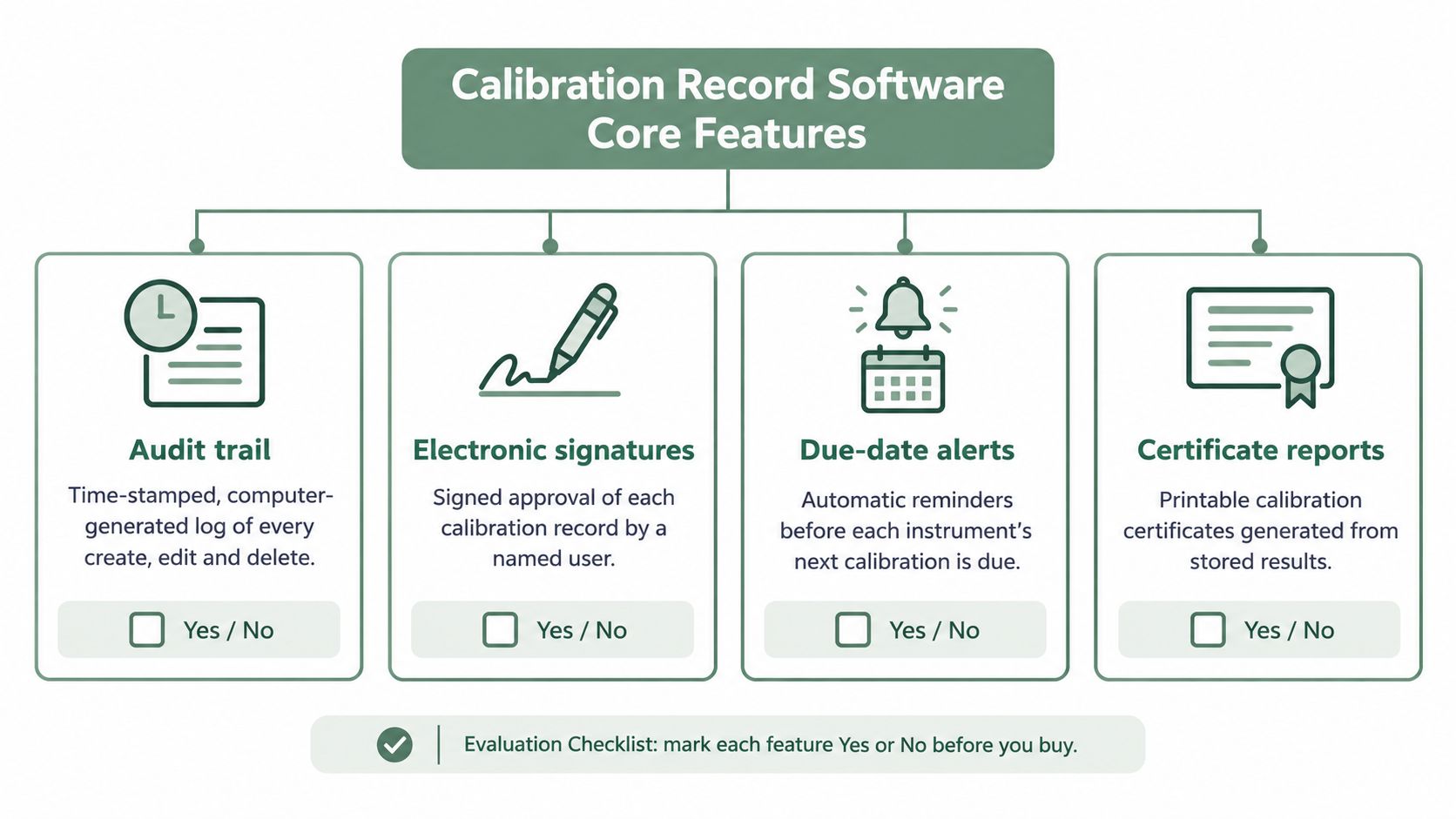
The checklist graphic highlights common purchasing criteria. Electronic approval deserves separate attention wherever the laboratory's workflow requires it.
Features in working order
Audit trail. The system should generate a time-stamped history of creation, modification and deletion. A correction should preserve the original value, author, time, reason and required approval. An overwritten spreadsheet cell without recoverable history is the obvious failure mode.
Scheduling. Due dates should follow approved intervals for the relevant instrument, with configurable warning windows and an unmistakable overdue status. A reminder sent to an absent equipment owner isn't an effective control unless someone else receives responsibility for the task.
Instrument linking. Each device needs a stable asset ID that follows it across rooms and users. The laboratory also needs a deliberate way to identify experiments performed since its last passing check, whether through direct links or consistent equipment identifiers in experiment records.
Certificates. Issued reports should attach to the relevant event and remain searchable by instrument and reference standard. A certificate collection that omits assigned values, uncertainty or supporting event details won't answer every technical question.
The IAS metrological traceability and measurement policy supports evaluating calibration evidence through equipment identity, results, acceptance criteria, intervals and traceability. These fields deserve explicit testing rather than assumptions based on a product category.
A yes-or-no evaluation checklist
| Evaluation Block | Questions That Should Receive a Clear Yes |
|---|---|
| Records | Are raw readings, standard identities, environmental inputs and uncertainty factors stored? Does the system prevent closure when required information is absent? |
| Audit trail | Does each action identify its user and time? Do corrections preserve original values and reasons? |
| Access | Does each user have an individual identity? Can roles separate entry, review and approval? |
| Scheduling | Are intervals approved? Can warning and overdue settings be configured without silently rewriting historical decisions? |
| Instrument linking | Is there one history per asset? Can staff identify its use since the last acceptable check? |
| Export and storage | Can the complete record and audit history be exported in readable formats such as PDF, DOCX or a spreadsheet? Are backup, restoration and retention arrangements documented? |
Vendor discussions should also establish how upgrades are tested, what documentation supports validation, and what work the laboratory must perform before accepting a changed version. The evaluation should include migration, training and ongoing administration, not just initial configuration.
The decisive demonstration uses a failed calibration. A technician enters it, corrects a value, removes a test attachment through the permitted workflow, and exports the event. The reviewer then checks whether the corrected and deleted information remains visible in the history.
Compliance Basics for 21 CFR Part 11 and ISO/IEC 17025
21 CFR Part 11 concerns electronic records and signatures within its scope in FDA-regulated work, rather than every digital laboratory note. Its closed-system controls address trustworthy records, including protected access and secure, time-stamped histories that don't obscure previous information.
ISO/IEC 17025 addresses the competence of testing and calibration laboratories. The technical-record guidance hosted by the Saudi Food and Drug Authority describes preservation of original observations, derived data, personnel information and issued reports, together with uncertainty-related information and safeguards for electronic records.
Requirements and the software controls that support them
| Requirement | Source | What the Software Should Do |
|---|---|---|
| Closed electronic systems keep records authentic and protected | 21 CFR Part 11 | Enforce unique user identities and role-based access |
| Audit trails record create, modify and delete actions | 21 CFR Part 11 | Keep a time-stamped, append-only history that corrections cannot hide |
| Original observations and derived data are retained | ISO/IEC 17025 technical records | Store raw readings alongside calculated results |
| Calibration can be repeated under conditions close to the original | ISO/IEC 17025 technical records | Store method, standards and environmental conditions |
| Electronic records are safeguarded against loss or unauthorized alteration | ISO/IEC 17025 technical records | Provide backups, access control and controlled retention |
| Equipment and software significant to the work are documented | ISO/IEC 17025 technical records | Record software version and relevant instrument settings |
| Equipment without a valid calibration is removed from service | FDA laboratory guidance | Show overdue status that flags or blocks use |
| Audit history stays available for inspection | Records retention guidance | Export the full audit history alongside the record |
FDA laboratory guidance addresses removing equipment from service when required calibration or maintenance hasn't been performed. An application status flag supports that procedure, but the laboratory still needs a physical or operational control that prevents continued use.
For record-change controls, the practical distinction between ordinary editing and controlled history is explained further in the guide to audit trail software. An approval button alone doesn't establish that the underlying system meets applicable requirements.
Software supplies controls. Laboratory staff establish whether those controls are appropriate, verified and consistently followed.
Responsibilities that remain with the laboratory
The quality group still defines procedures, trains personnel, approves acceptance criteria, establishes retention periods and determines validation requirements for the intended use. Staff must also test restoration from backup and confirm that retained records remain readable.
This table is a starting point for evaluation, not legal or accreditation advice. Applicability and interpretation should be checked with the laboratory's quality group and, where appropriate, its accreditation body.
Dedicated Software, CMMS Modules and Spreadsheets Compared
Labs often start with an asset spreadsheet, reminder emails and a shared certificate folder. That starting point treats calibration software as a scheduler and leaves the harder question unanswered: can the laboratory reconstruct what happened to a record, why it changed, and which experiments an out-of-tolerance result touches?
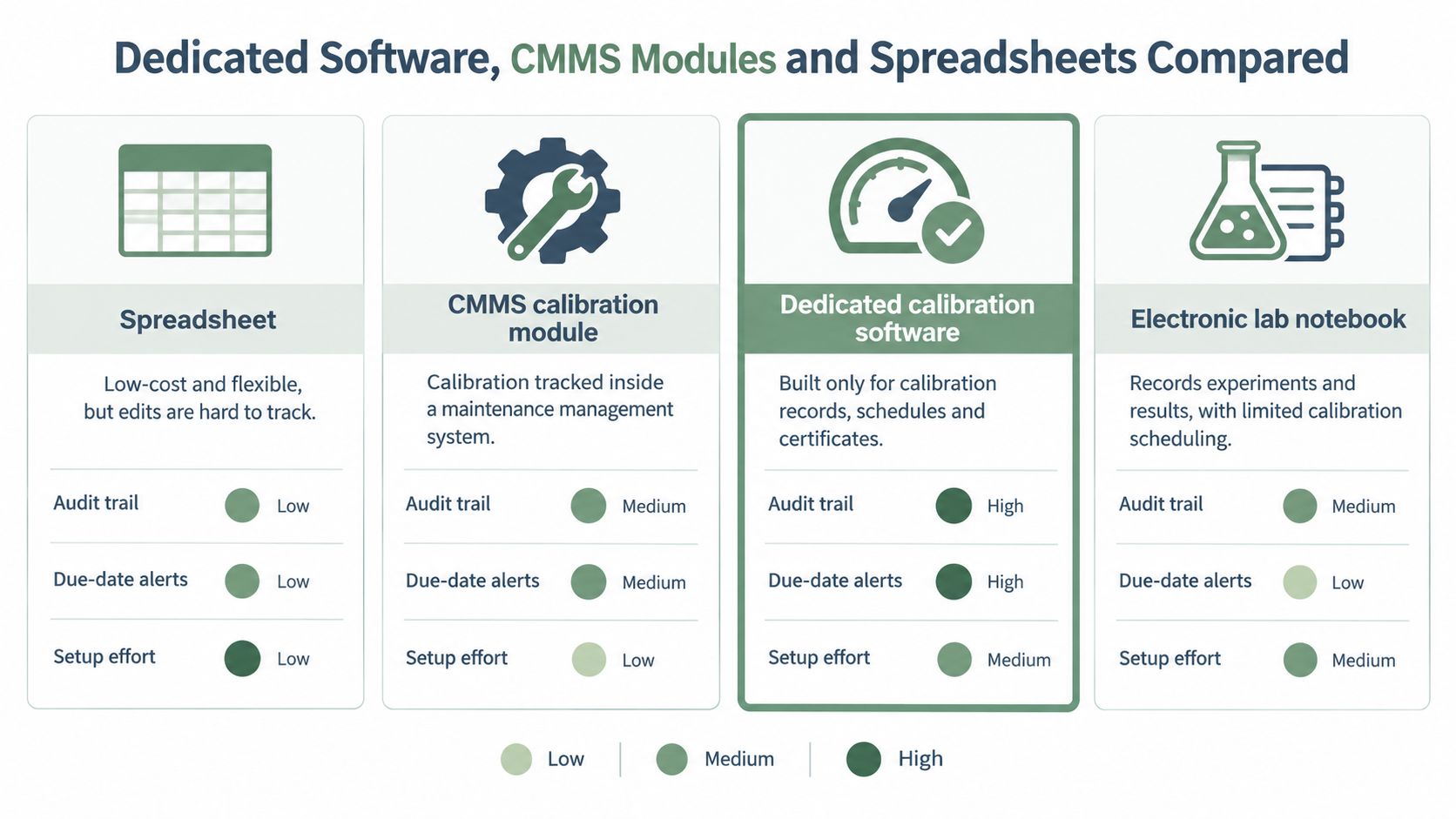
The comparison graphic summarizes broad categories. Each option still needs a live demonstration against the laboratory's own requirements.
Calibration record options compared
| Option | Strengths | Gaps | Best Fit |
|---|---|---|---|
| Spreadsheet | Easy to customize using familiar tools | Overwrites are easy; controlled history and reminders need deliberate arrangements | A few instruments in one lab with a strict versioning habit |
| CMMS calibration module | Links calibration to maintenance work orders | May lack metrology fields such as uncertainty or reference-standard relationships | Facilities teams already running a CMMS |
| Dedicated calibration software | Designed around intervals, certificates and instrument history | Requires setup, training and validation where applicable | Multi-site or accredited labs with many instruments |
| Electronic lab notebook | Keeps experiment context and review together | May not provide a complete instrument-calibration lifecycle | Recording an individual check within an experiment |
FDA data-integrity guidance defines integrity through completeness, consistency and accuracy, and describes audit trails as secure, computer-generated, time-stamped records of creation, modification or deletion. Paperless systems still need explicit audit-trail, access and review controls to demonstrate those qualities.
A small academic group may run a protected, versioned spreadsheet when responsibilities and review are explicit. That arrangement relies on discipline rather than enforced controls, so it deserves reconsideration when the record's risk or regulatory role changes.
A facility already using a computerized maintenance management system, or CMMS, should inspect its calibration module before adding another application. Check whether it captures uncertainty fields and reference-standard relationships, since those fields determine whether a failed calibration can be traced to the experiments it affects. Forge Reliability's CMMS data governance for maintenance teams gives useful context for discussing asset identifiers, ownership and maintenance-record governance.
For occasional experimental checks, a separate controlled calibration record can stay linked to the research notebook through the instrument ID and event reference. An equipment maintenance log template can help organize upkeep, while the calibration record itself carries the measurement evidence.
Dedicated software becomes a stronger candidate when the laboratory must coordinate many instruments, reviewers or locations. The deciding evidence comes from a demonstration: can the system show who changed a record, when and what the earlier value was, and can it list every experiment tied to an instrument that later failed? Selection should follow controls demonstrated live against the laboratory's requirements.
Benefits and Return on Investment for Research and QC Labs
The returns worth counting are operational: less certificate searching, faster assembly of inspection records, clearer visibility of drift, and fewer repeated experiments caused by gaps in equipment evidence. Each return needs a traceable link to a changed workflow.
A due-date reminder supports scheduling. The larger return comes from an evidence trail that can reconstruct what happened, who changed the record and why, and which experiments an out-of-tolerance result touched.
Historical comparison is another legitimate use. NIST's calibration check standards database publication describes electronic storage, retrieval, searching and preservation of reference data for longer-term use.
A worked planning calculation
Build the annual baseline from local task times and event counts.
| Activity | Annual Calculation |
|---|---|
| Assemble instrument histories for audits | 4 hours per audit × 2 audits = 8 hours |
| Chase overdue certificates | 6 hours per quarter × 4 quarters = 24 hours |
| Total baseline administrative effort | 8 hours + 24 hours = 32 hours |
These entries produce a 32-hour annual baseline. A 40-instrument inventory widens the possible impact of missing evidence, while the baseline remains a staff-effort figure.
Calculate the net annual return
Use the measured share of baseline work the new workflow removes:
Net annual return = (32 hours × loaded hourly rate × measured reduction share) - counted costs
Then calculate return relative to those costs:
ROI = net annual return / counted costs × 100
Count implementation, training, administration and ongoing system costs for the period being evaluated. The measured reduction share comes from pilot data, rather than an assumption that the entire 32-hour baseline disappears.
Repeated experiments need a separate expected-loss line:
Avoided repeat loss = repeat frequency × full repeat cost × preventable share
Full repeat cost includes reagents, instrument occupancy and staff time. Enter a preventable share only when records connect a past repeat to missing equipment evidence and show that the new workflow would close that gap.
Measurement rule: Enter zero for any improvement the records do not yet support.
A two-quarter pilot can supply the measured reduction share and repeat frequency. Record certificate-search time, history-assembly time and unresolved documentation gaps before and during use, then test whether the record retrieves evidence and identifies affected work faster. A positive ROI calculation supports the purchase; a weak result leaves the justification to a demonstrated control requirement.
Failed Calibrations and the Records That Protect Your Results
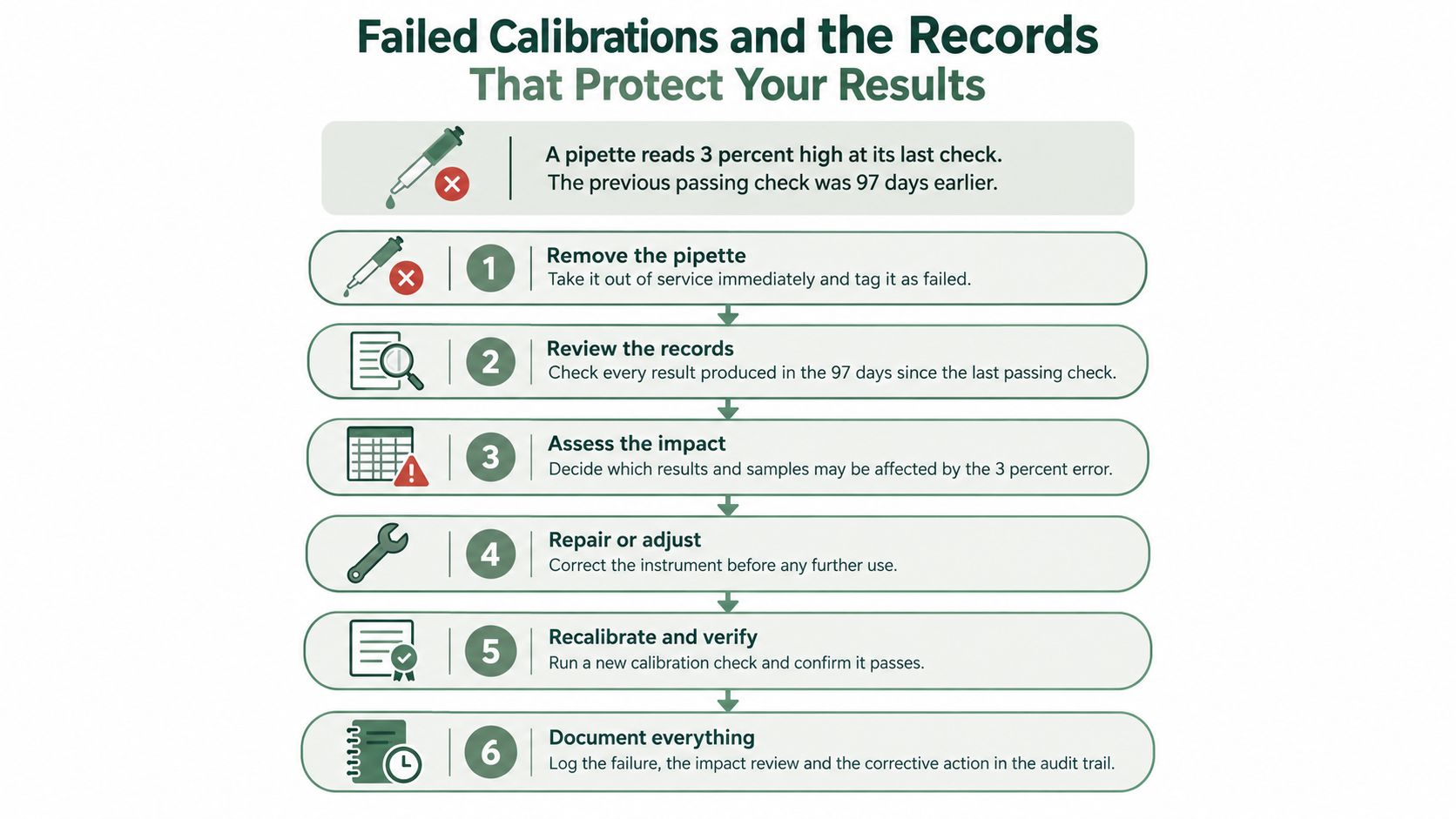
Consider an illustrative scenario: a pipette is found 3 percent high, and its previous passing check occurred 97 days earlier. Those hypothetical values define the investigation window, but they don't establish that the same error existed throughout it.
The flow chart shows the containment, assessment and restoration sequence for that scenario.
An impact-assessment workflow
- Remove the instrument from service. Record its status and prevent further use.
- Locate the last acceptable calibration, including its source readings and review evidence.
- Identify potentially affected work. List experiments, sample batches and reported results generated with that instrument since the acceptable check.
- Record the actual error at each tested point, including channel or range where relevant. A single pass/fail label isn't enough.
- Assess each result against its intended use. Consider acceptance criteria, sensitivity to the observed error and accompanying controls before deciding on retesting.
- Preserve the rationale, approver and corrective action. Return to service requires appropriate correction and documented verification, not merely closure of the investigation.
A failed check doesn't automatically invalidate all previous work. It also doesn't establish that earlier results remain valid. The scientific decision needs an explicit rationale rather than an assumption about when the deviation began.
Typical checks and the records to link when they fail
These are practical examples; the laboratory must establish its own procedures and frequencies.
| Instrument | Typical Check | Records to Link When It Fails |
|---|---|---|
| Pipette | Gravimetric check at set volumes | Tip type, channel, last passing check, assays run since then |
| Analytical balance | Daily check with certified weights where specified by procedure | Weight certificate IDs, room conditions, weighings since last pass |
| pH meter | Buffer calibration before use where specified by procedure | Buffer lot and expiry, slope reading, runs that used the meter |
| Incubator | Temperature check against a reference probe | Set point, probe ID, cultures incubated since last pass |
| Thermocycler | Block temperature verification | Verification date, PCR runs since last verification |
Shared instruments make deliberate linking especially important because equipment records and experiment notes often live separately. The laboratory equipment test guide offers a related framework for organizing checks.
The accompanying video provides additional material alongside the written workflow.
FDA guidance on record copies treats electronic copies as true copies only when they preserve original content and meaning, including metadata, and reiterates second-person review of original laboratory records. The completed impact record therefore needs original entries, timestamps, authorship and context, not just a polished conclusion.
Start Your Calibration Record Setup This Week
A rollout that tries to cover every instrument at once usually stalls. Start instead with the record that would be hardest to defend in an audit: the device whose last passed result nobody could rebuild from stored inputs. A bounded rollout can follow these steps:
- Build the instrument list. Identify each device, its owner, its current interval and its last certificate.
- Define the record fields. Set required fields and acceptance criteria before importing historical information. Mark missing evidence as missing; a gap left visible is more defensible than a gap reconstructed without support.
- Assign responsibilities. Separate result entry, technical review and approval where the workflow requires it.
- Run a parallel pilot. One quarter on a defined group of instruments, with the existing controlled records remaining authoritative during evaluation.
- Test reconstruction. Pick one instrument and rebuild its latest result entirely from stored inputs. If the record cannot explain what happened and why, the field definitions from step two need work.
- Train for failures. Staff should know containment and impact assessment before the first failed calibration enters the new workflow, because that is when the evidence system earns its cost.
- Schedule oversight. A proposed starting cadence is monthly review of overdue items and annual review of intervals, adjusted to laboratory risk and applicable procedures.
Where bench capture fits
Verbex is a private, on-device lab documentation app for iPhone and iPad from Verbal Experiment. Scientists select a record section, then capture voice notes, typed notes or photos while their hands are busy; a photo of a reagent label fills in catalog, lot and expiry details. A drift observation or unexpected display reading can be recorded while the event is fresh, with each entry timestamped and kept on the device. Review & Complete prepares a draft from those notes for the scientist to check, edit and complete, and finished records export as PDF or Word or transfer to an existing ELN. A beta question-asking feature, powered by Apple Intelligence, answers questions across completed experiments with links back to the original notes, which helps when an out-of-tolerance result raises the question of which runs it touches.
The app requires no account and uses no cloud storage. It does not manage calibration schedules, certificates or equipment history, and it does not replace an official ELN or validated calibration system. Scientific interpretation, impact decisions and regulatory approval remain with qualified people.
For bench observations that belong beside a calibration investigation, Verbex provides timestamped capture and a source-backed record for human review. Visit Verbal Experiment to download Verbex for iPhone and iPad, free to use alongside the laboratory's calibration system rather than in place of it.