 Blog
Blog
Custom Lab Notebook: What It Is and How to Build One
A reagent lot number sits in a protocol margin, the shaker stopped during incubation, and the final notebook entry still says the method was followed without changes. A custom lab notebook should prevent that mismatch by capturing what happened, with labeled fields, timestamps, preserved corrections, and links to the original evidence. Its layout matters less than whether another scientist can trust the record.
By Multimod Labs.
Table of Contents
- What a Custom Lab Notebook Is and Why It Matters
- The Core Fields Every Custom Notebook Needs
- How Retention Rules Shape What You Record
- Choosing a Setup and Protecting Its Records
- How to Capture, Review and Seal Each Entry
- Pilot Your Notebook Setup With One Real Experiment
What a Custom Lab Notebook Is and Why It Matters
At the bench, recording a lot number in a margin can feel sufficient. Later, a colleague investigating an unexpected result must first find that particular protocol printout, recognize the handwriting, and work out which experiment used the reagent. A labeled Materials field gives that information a predictable home.
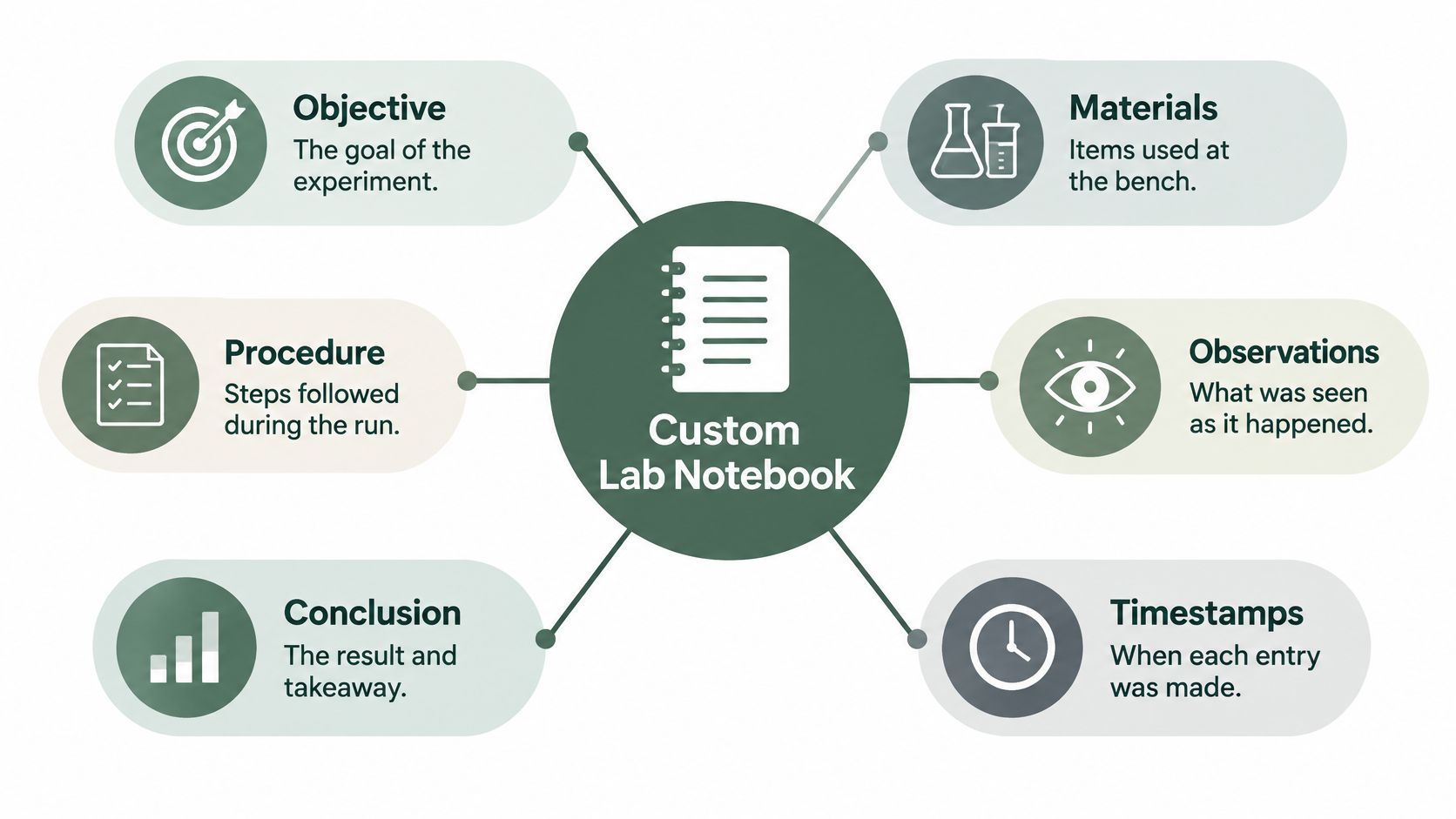
A custom lab notebook is a bench record shaped around the laboratory's methods. It combines Objective, Materials, Procedure, Observations, and Conclusion with experiment identifiers, authorship, timestamps, and a visible history of changes. Customization means adapting the record to the work, not removing inconvenient evidence.
A record another scientist can use
A diary records what felt important that day. A laboratory notebook must preserve enough information for someone else to reconstruct the work.
The NIH guidelines for conducting research describe reproducibility or reconstruction by another person or research group as the central purpose of scientific record keeping. They call for clear, complete, organized, dated records assigned to a particular person, with identifiable corrections, secure storage, and backups.
That standard changes what belongs in an entry. A failed preparation, uncertain observation, or unexpected temperature change may matter more than a polished explanation written after the result is known.
The main sections provide a place for each kind of information.
Useful customization versus decoration
The practical benefits come from specific design choices:
- Comparable structure: Consistent labels let colleagues compare experiments across authors and projects.
- Meaningful timestamps: Recording when a note was captured helps distinguish an immediate observation from later interpretation.
- Controlled access: A deliberate storage and sharing policy keeps unpublished procedures within approved boundaries.
A searchable lot field is useful only if the entry also identifies the experiment and the reagent's role. A timestamp is useful only if its meaning is clear, such as capture time rather than export time.
A tidy entry isn't necessarily a strong record. The test is whether another scientist can reconstruct the work without filling gaps from imagination.
The central design question is therefore practical: which customizations protect the science, and which merely make the notebook look organized?
The Core Fields Every Custom Notebook Needs
Core fields for a custom lab notebook entry
The entries below are illustrative documentation examples, not experimental instructions.
| Field | What to record | Example entry (illustrative) |
|---|---|---|
| Objective | The question and expected outcome | Test whether lysis buffer B lowers background relative to buffer A |
| Materials | Reagent, supplier, catalog number, lot, expiry and concentration | Buffer B; supplier and catalog transcribed from label; lot and expiry verified against attached label; working concentration recorded with units |
| Procedure | Planned protocol with its version number | Controlled lysis protocol, revision identified in attached copy |
| Observations | Timed raw values and photos, labeled as observed | At the recorded capture time, visible precipitate remained; original photo attached |
| Deviations | What changed, why, and when | Incubation extended 10 minutes after shaker failure |
| Conclusion | Interpretation kept separate from observations | Background reduced; repeat with a second lot |
| Attachments | Instrument files and calculations linked to their entry | Plate reader export and background-subtraction sheet, linked to this entry |
The Objective keeps the question separate from the eventual answer. Recording the expected outcome before the run also prevents a later interpretation from becoming the original hypothesis.
Materials needs more than a product name. Supplier, catalog identifier, lot, expiry, preparation details, concentration, and units let a reviewer distinguish materials that otherwise look interchangeable.
Preserve the distinction between plan and event
The Procedure identifies the intended method and its version. It shouldn't become a rewritten protocol that conceals departures during the run.
Observations hold measurements and descriptions. Deviations explain departures from the plan, including the reason and timing. Conclusion holds interpretation, uncertainty, and the next useful experiment.
The University of Texas at Arlington's notebook procedure supports recording purpose, experimental conditions, quantitative and qualitative results, outcomes, and next steps while preserving errors rather than obliterating them. In practice, observation and interpretation need visibly different locations: visible precipitate is an observation; incomplete solubilization is an interpretation.
Attachments need explanatory context and a stable location. A plate image without an orientation key, or a calculation sheet without its input file, leaves the reviewer with another puzzle.
Keep the template short enough to use
A recurring method can justify a custom section for instrument settings, environmental conditions, or preparation history. Required fields should describe information the laboratory needs, not encourage routine copying of unchanged prose.
The ELN template builder offers a starting point for adapting that structure. The Lab Documentation Pack templates are editable documentation scaffolds, not scientific, safety, legal, or regulatory advice; worked examples and formulas require local review and validation against applicable SOPs.
A manageable revision this week is to add these fields:
- Protocol revision: Identify the method used.
- Reagent lot: Record the label identifier, not a remembered shorthand.
- Deviation time: Locate the departure within the run.
- Raw-data location: Preserve the file path or controlled reference.
- Entry author: Identify who performed and documented the work.
The next useful step is to apply those fields to a current experiment before expanding the template further.
How Retention Rules Shape What You Record
A notebook must remain useful after the experiment ends and after its author leaves the laboratory. Retention therefore affects file organization, identifiers, access, and backup decisions from the beginning.
The FDA's records and reports guidance describes the following minimum periods for the specified nonclinical study records, alongside expectations for organized archives and retrievable, protected records.
Minimum retention periods for nonclinical study records
| Study status | Minimum retention |
|---|---|
| Submitted to support a research or marketing permit, and approved | At least 2 years after approval |
| Submitted to support a permit, not yet approved | At least 5 years after submission |
| Does not support a permit application | At least 2 years after completion, termination, or discontinuation |
These aren't universal deletion dates for every laboratory notebook. The study's obligations, institutional policy, agreements, and any applicable preservation requirements need review before disposal.
Convert retention into notebook habits
Long-term retrieval requires more than keeping a readable final page. The record needs an experiment identifier that also appears on its supporting files, a dated export, and a controlled backup outside the capture device.
A practical archive should preserve:
- The record's state: A dated, frozen copy of the completed entry.
- The source evidence: Original instrument files, images, calculations, and relevant metadata.
- The relationship between files: Enough indexing to connect each attachment with its experiment.
- Continuing access: Storage that doesn't depend solely on the original author's device or account.
A PDF or Word export should be treated as a presentation copy unless the institution's records authority designates it as the authoritative record under its procedures. Exporting a polished document doesn't establish that all source evidence or revision history has been retained.
Test retrieval without the author
In an illustrative scenario, a reviewer reopens a study completed four years earlier. The team must recover the raw files, protocol revision, and reagent lots without asking the original author to explain an old folder hierarchy.
The documentation retention guide can help frame that archive planning. Outside laboratory work, Casewell's guide to co-parenting documentation provides a different context for considering dated records; it isn't authority for laboratory retention decisions.
Archive check: A retained file is useful only when an authorized colleague can find it, open it, and understand its relationship to the experiment.
The first retention question is which study type is being run? The answer determines which obligations the laboratory must evaluate.
Choosing a Setup and Protecting Its Records
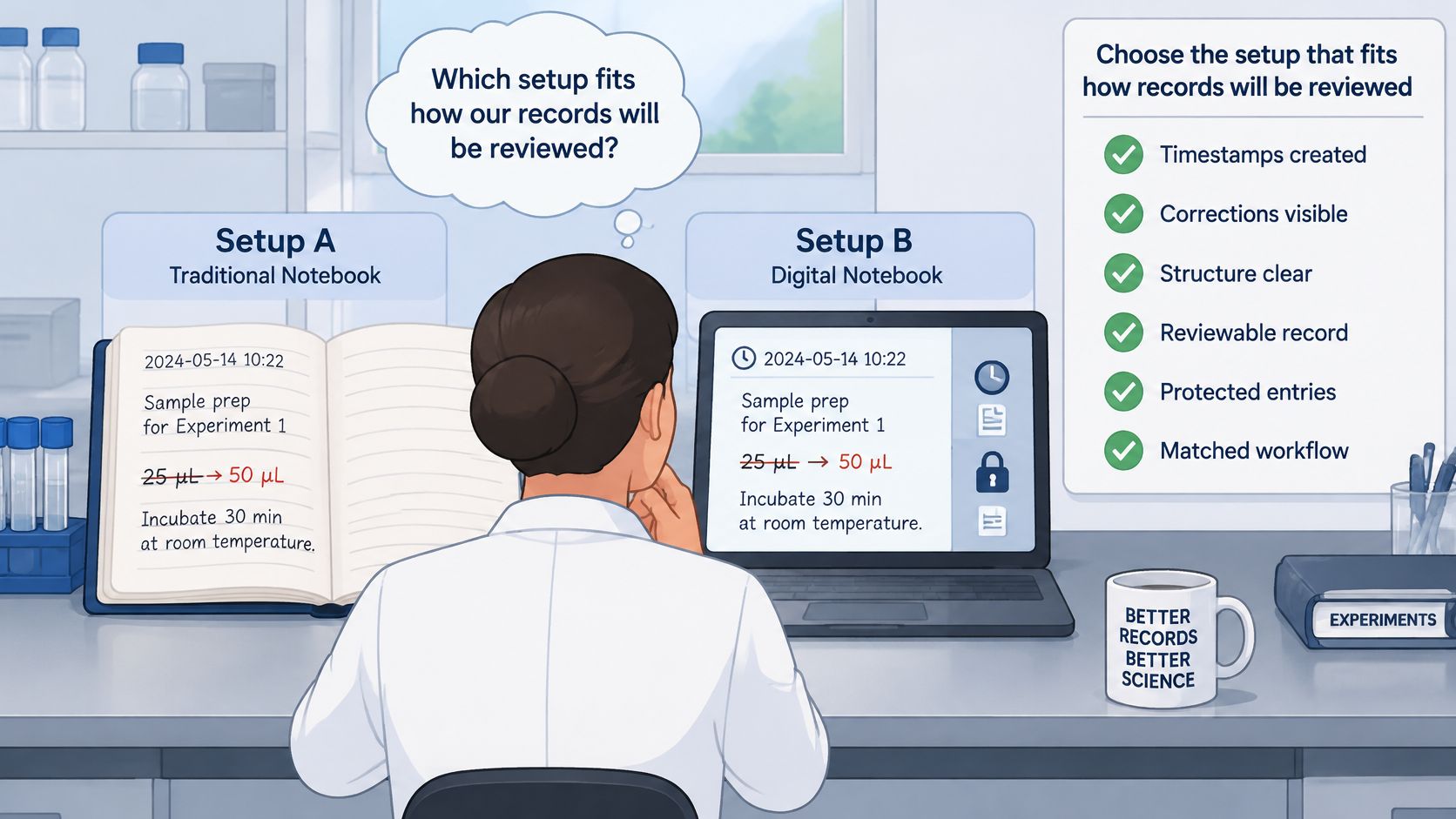
A notebook can look organized and still leave a reviewer unable to establish when an observation was recorded or what changed afterward. Choose the setup around the review path, then test how it preserves timestamps, corrections, attachments, and exports.
Notebook setups compared on record-keeping criteria
These are workflow categories, not assessments of every product. Confirm each application's behavior in the configuration the laboratory will use.
| Option | Timestamps | Correction trail | Export | Best fit |
|---|---|---|---|---|
| Bound paper notebook | Dates written by hand | Strike through, initial, and date each correction | Scan or photograph pages | One bench with low volume |
| Generic notes app | Check creation and edit-date behavior | Confirm whether earlier versions remain accessible | Verify plain-text or PDF sharing | Personal drafts, not assumed sealed records |
| Dedicated lab notes app, such as Verbex | Check how source captures are timestamped | Review how edits appear before and after completion | Export to PDF or Word | Bench capture beside an existing ELN |
| Full electronic lab notebook | Confirm system-generated timestamps | Verify audit-trail behavior in the configured system | Confirm vendor-supported formats | Team records that need formal review |
The physical capture environment matters as much as the software interface.
Match the setup to the reviewer
Start with the person who must evaluate or reuse the record. A supervisor reviewing exploratory work, a colleague repeating an assay, and a formal quality reviewer may need different controls.
Indiana University's laboratory notebook guidance recommends chronological, identifiable records and consecutively numbered, bound or otherwise tamper-evident pages, with appropriate witness review by someone who isn't a co-inventor. Paper can provide useful evidentiary structure, while digital systems can support search and retrieval.
The practical trade-off is how each setup connects the entry to its evidence. Paper needs an index and a controlled way to reference instrument files. A digital notebook needs correction and export behavior that preserves enough context for review.
Evaluate each candidate against these criteria:
- Timestamp creation: Distinguish event time, capture time, modification time, and export time.
- Correction visibility: Confirm that a reviewer can recover the original wording and understand the amendment.
- Template flexibility: Check whether customization preserves required context or lets authors omit it.
- Export fidelity: Open a representative export and inspect attachments, identifiers, formatting, and source references.
- Processing and storage: Identify every destination for notes, images, transcripts, and backups.
- ELN fit: Confirm how the completed capture record enters the laboratory's official workflow.
A completed record should preserve its completed state and make later amendments identifiable. Test that behavior with a representative entry and export.
Apply a privacy checklist
The NIST mobile-device security guidance recommends strong encryption for stored mobile data and communications, and describes the security trade-offs of convenient mobile features. Local processing reduces some transmission paths, but a device still needs a lock, and an exported attachment can still reach the wrong recipient.
Before unpublished work enters any app, the laboratory should establish:
- Storage location: Whether original captures remain on the device or are copied elsewhere.
- Processing location: Whether transcription or organization sends content to an external service.
- Account requirements: Who controls access and what happens when personnel leave.
- Background services: Whether advertising, analytics, or tracking are present.
- Transfer protection: What safeguards protect exports and approved backups.
- Recipient access: Who can open, forward, or alter a shared file.
For a failed device, a specialist such as MDrepairs' certified data recovery lab is a contingency to assess with institutional authorization. Recovery work may expose confidential material, so permission and handling requirements matter.
Where a bench capture companion fits
Verbex is an iPhone and iPad app for notes, calculations, transcription, plate maps, dilution math, formatting, and curve fitting. Its Review & Complete feature prepares a draft from the user's notes for the user to check, edit, and complete. The capture workflow can fit beside an existing ELN when the laboratory has defined how records and supporting files move into its official process.
The scientist selects Objective, Materials, Procedure, Observations, Conclusion, or a custom section before capture. The app does not independently decide a note's scientific meaning. On-device processing of supported material-label images can create structured entries in Materials; that function does not interpret every scientific image.
On supported Apple Intelligence devices, Ask can answer questions across completed experiments, with answers linked to the user's notes and processed on-device. Answers and organized drafts still require scientific judgment and institutional review.
Truth first. Privacy by default. Humans in control. Device locking, appropriate encryption, secure backup, and institutional data-policy checks still apply.
How to Capture, Review and Seal Each Entry
A record can look orderly and still be difficult to trust if its source observations, later clarifications, and final review are blurred together. Completion should mean the scientist has checked the evidence against the original captures.
For applicable regulated electronic records, 21 CFR 11.10(e) requires secure, computer-generated, time-stamped audit trails, changes that don't obscure earlier information, and retention of audit-trail documentation for at least as long as the associated records. Those requirements don't make a general-purpose capture app compliant by default.
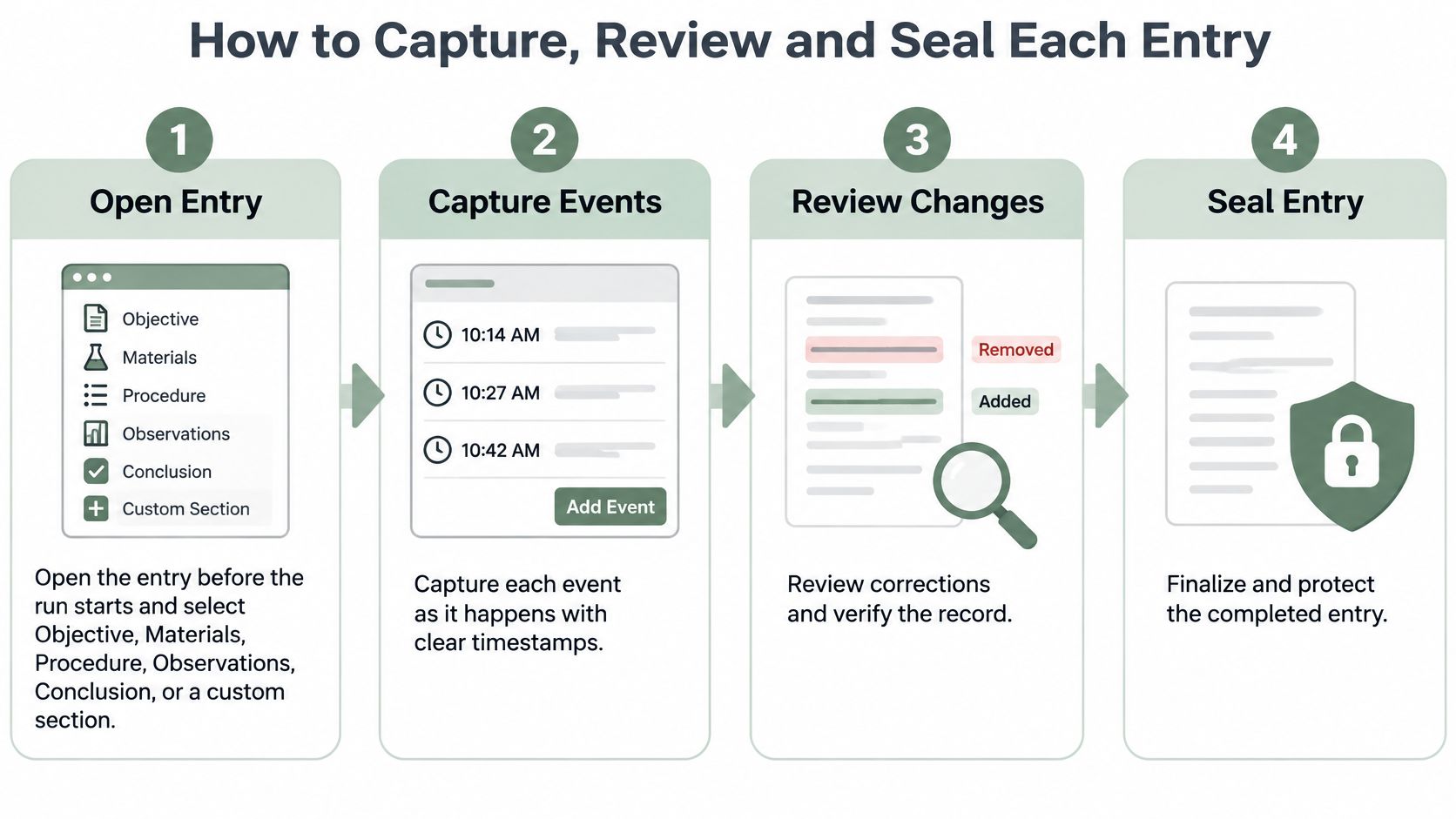
Follow the capture-to-completion sequence
Open the entry before the run. Establish the experiment identity and select Objective, Materials, Procedure, Observations, Conclusion, or a custom section. Set the record's structure before work begins so later sorting doesn't have to supply missing context.
Capture events as they happen. Voice, typed notes, timers, and photos suit different bench situations. Voice can help when hands are occupied; a photo may preserve a visual change more clearly than a hurried description.
Log deviations at the event. Record what changed, when it changed, and the immediate reason. A contemporaneous account is easier to evaluate than one written after the outcome is known.
Generate and inspect the draft. Review & Complete prepares a source-backed draft. On supported devices, local Apple Intelligence processing may also offer an ELN-style draft. Check each statement against its original capture, then decide what belongs in the record.
Preserve errors when correcting them. A dated amendment should identify the error and explain the correction without erasing the original account. If the capture tool can't preserve that history, the official workflow must address the limitation.
Verify supporting evidence. Check attachment identity, reagent lot and expiry, chronology, units, and raw-file references. Compare any transcribed label details with the source image.
Complete and export the checked record. PDF or DOCX can carry the completed state into an approved ELN or archive. Use the official system for formal sealing and amendment controls when required.
The sequence keeps capture, verification, and completion distinct.
Label reconstruction
If an event was missed, add a reconstruction note with the actual date it was written and state that the details were recalled from memory. Leave the original timed entries untouched.
For example: “Written 18 May 2025. The 14:20 buffer addition was recalled from memory; I did not record it at the time. The volume was 2 mL.” The date records when the clarification was made, not when the event occurred.
Use the good documentation practices guide to shape a local review checklist. Check the finished draft against its source captures before treating it as complete.
Pilot Your Notebook Setup With One Real Experiment
A useful pilot starts with a real experiment and a colleague who didn't perform it. The experiment should include the ordinary difficulties of bench work, such as a changed condition, a label image, or separately generated instrument data.
Before the run, the team agrees on required fields, the deviation-recording method, and who is responsible for completing the draft. The reviewer shouldn't need private explanations that never enter the record.
Test the exported record, not just the screen
After capture and review, the colleague receives the exported file and attempts these checks:
- Locate a result: Identify its units and the source file supporting it.
- Find a reagent lot: Connect the material to its use in the procedure.
- Explain a deviation: Establish what changed and whether the conclusion acknowledges it.
- Follow an attachment: Open the referenced evidence from the approved archive.
- Recognize an amendment: Distinguish the original entry from later clarification.
If the reviewer can't complete a check, the team revises the template, naming convention, or export process. Adding more prose won't necessarily fix an ambiguous file reference.
Turn the successful pilot into a local procedure
The laboratory SOP should state required fields, study-specific retention responsibilities, correction rules, approved storage, and the export format accepted by the official ELN. A representative file should be tested against the ELN's import rules before the next study.
For editable starting materials, the Lab Documentation Pack contains 16 templates across 42 Word, Excel, and PDF files, with worked examples and working formulas. Laboratories may adapt the files for their own lab, course, or organization, while sharing the pack-page link rather than distributing the files.
The pilot succeeds when a colleague can understand the evidence without the author standing beside the screen.
The practical next step is a bench-capture pilot beside the existing ELN, with the official record and its controls left in place.
Verbex offers private, on-device capture of voice notes, typed notes, timers, and images for a source-backed record that a scientist reviews before export. Visit Verbal Experiment or Verbex to try Verbex for iPhone and iPad, free to download, in a real-experiment pilot beside the laboratory's existing ELN.