 Blog
Blog
Microscope Parts and How They Work Together
The usual advice to switch to a stronger objective can make a poor microscope image larger without making it more useful. Microscope parts work together to illuminate the specimen, form an image, and hold the correct plane in focus. Understanding their jobs is more useful than memorizing a labeled diagram, especially when a higher-power view looks cloudy rather than detailed.
By Multimod Labs.
Table of Contents
- What Compound Microscope Parts Do Together
- Three Groups of Microscope Parts
- Optical Parts That Form the Image
- How to Read Objective Markings
- Illumination Parts and Empty Magnification
- Mechanical Parts That Hold the Sample
- Cross References When the Image Fails
- Quick Reference for Microscope Parts
- How to Record the Setup You Actually Used
- A Practical Next Step After the Bench
What Compound Microscope Parts Do Together
A new lab member finds a promising structure, turns the nosepiece to a higher-power objective, and sees a dim, muddy field. The natural response is more light or more focusing. Neither necessarily addresses the problem.
The important distinction is magnification versus resolution. Magnification enlarges the view. Resolution determines whether nearby features can be distinguished. A microscope can succeed at the first while failing at the second.
One image depends on the whole instrument
The light source supplies illumination. The condenser prepares that illumination for the specimen. The objective collects light from the specimen and forms the primary image, while the eyepiece enlarges that image for viewing.
Meanwhile, the stage holds the specimen, the focus controls select the plane being examined, and the frame keeps the arrangement stable. These aren't interchangeable jobs. A brighter lamp can't correct an unsuitable objective, and a stronger eyepiece can't recover detail missing from the objective image.
Bench principle: A larger feature isn't necessarily a better-resolved feature.
The useful question isn't just which part controls magnification. It's which part prevents the current setup from delivering interpretable detail. Objective numerical aperture, condenser alignment, cover-glass compatibility, and sample depth all belong in that decision.
A practical way to navigate the parts
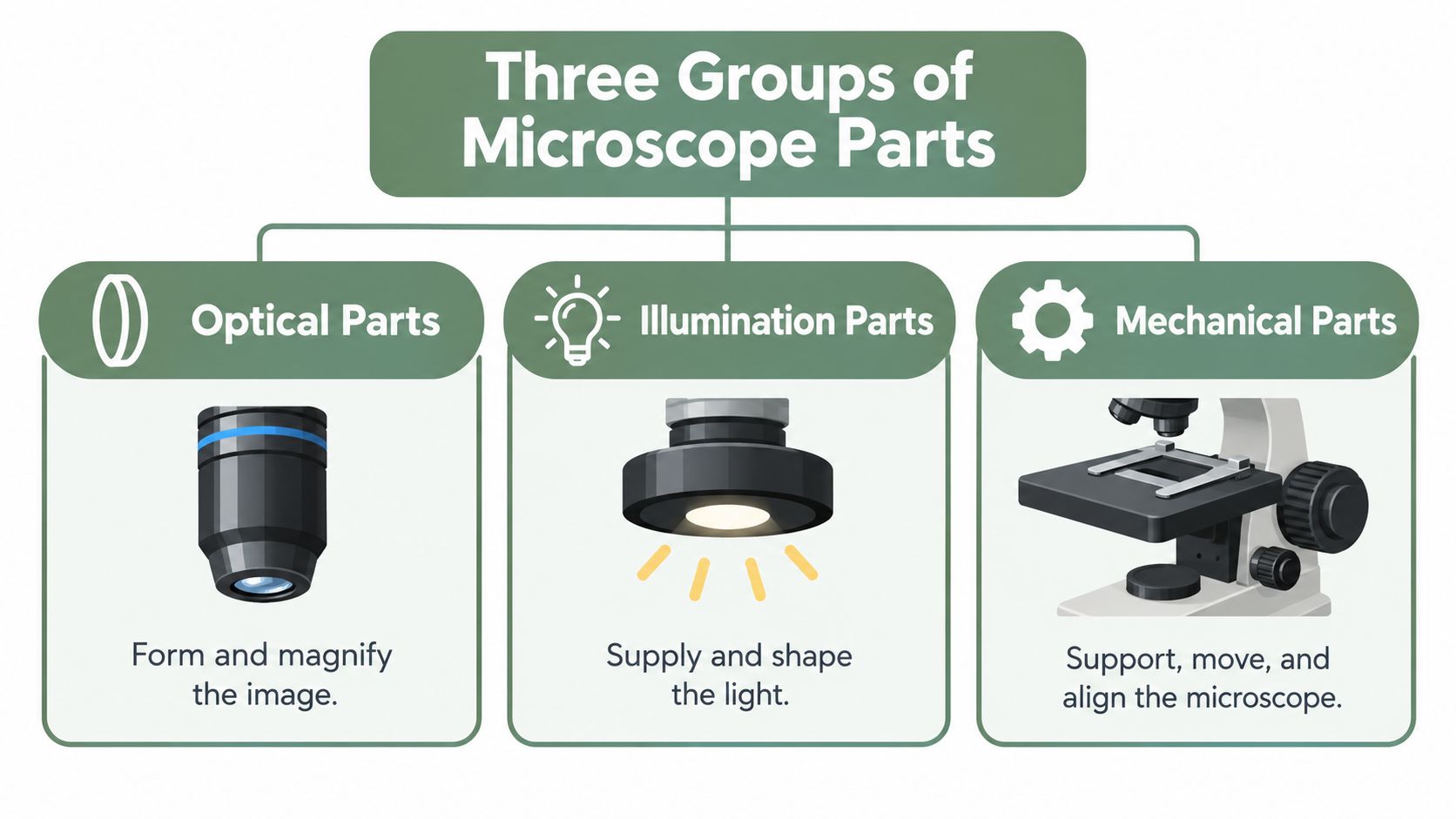
The major components fall into functional groups:
- Optical parts determine how the image forms and reaches the observer.
- Illumination parts determine how light reaches the specimen.
- Mechanical parts determine where the specimen sits and whether it stays there.
For each component, a useful bench reference connects its name to a job, a failure mode, and a first check. That connection turns a parts diagram into a troubleshooting system.
The scope here is a compound transmitted-light microscope. Individual instruments differ, so a control that isn't present shouldn't be assumed missing or defective. The instrument's own operating instructions remain the authority for its particular adjustments.
Three Groups of Microscope Parts
A specimen drifts off center and the hand goes straight for the fine focus. The reflex is understandable and usually misplaced, because a focus knob selects which plane is sharp while nothing in it grips the slide. Symptoms that feel identical through the eyepiece often belong to different groups of parts, which is why sorting the parts by job comes before touching anything.
Each group answers a different question
Optical parts answer one question: can the instrument form and display the required detail? The objective and eyepiece belong here, along with the image-forming components housed in the head.
Illumination parts answer a second: is light reaching the specimen in a form suited to the objective? The lamp or mirror, field diaphragm, condenser, and aperture diaphragm sit in this group.
Mechanical parts answer a third: can the specimen be positioned, focused, and held steady? The stage, slide holder, movement controls, focus knobs, arm, and base do that work.
The condenser deserves a second look. It contains lenses, yet it belongs with illumination because its job is shaping the incoming light. Where a part sits on the instrument matters less than which failure it causes.
A few parts sit on the boundary
Some components refuse a tidy label. The nosepiece is a mechanical selector that directly affects optical alignment. The head supports an optical path even though its housing is structural. Focus knobs move the specimen or the optical assembly rather than changing lens power.
Those boundary cases resolve themselves once a symptom appears. If a feature leaves the field, the stage and slide holder deserve attention first. If the feature stays centered but loses detail after an objective change, the optical and illumination groups deserve the same. Classify by job, and the first check lands near the observed failure instead of the nearest knob.
Optical Parts That Form the Image
Trace the image path in the order light travels it. The objective sits closest to the specimen and forms the primary image, and every part above it works on that image rather than on the specimen itself. That ordering doubles as a diagnostic sequence. When the view degrades, the cheapest checks sit at the top of the path and the most specimen-dependent ones sit at the bottom.
The diagram places those components within the complete instrument.
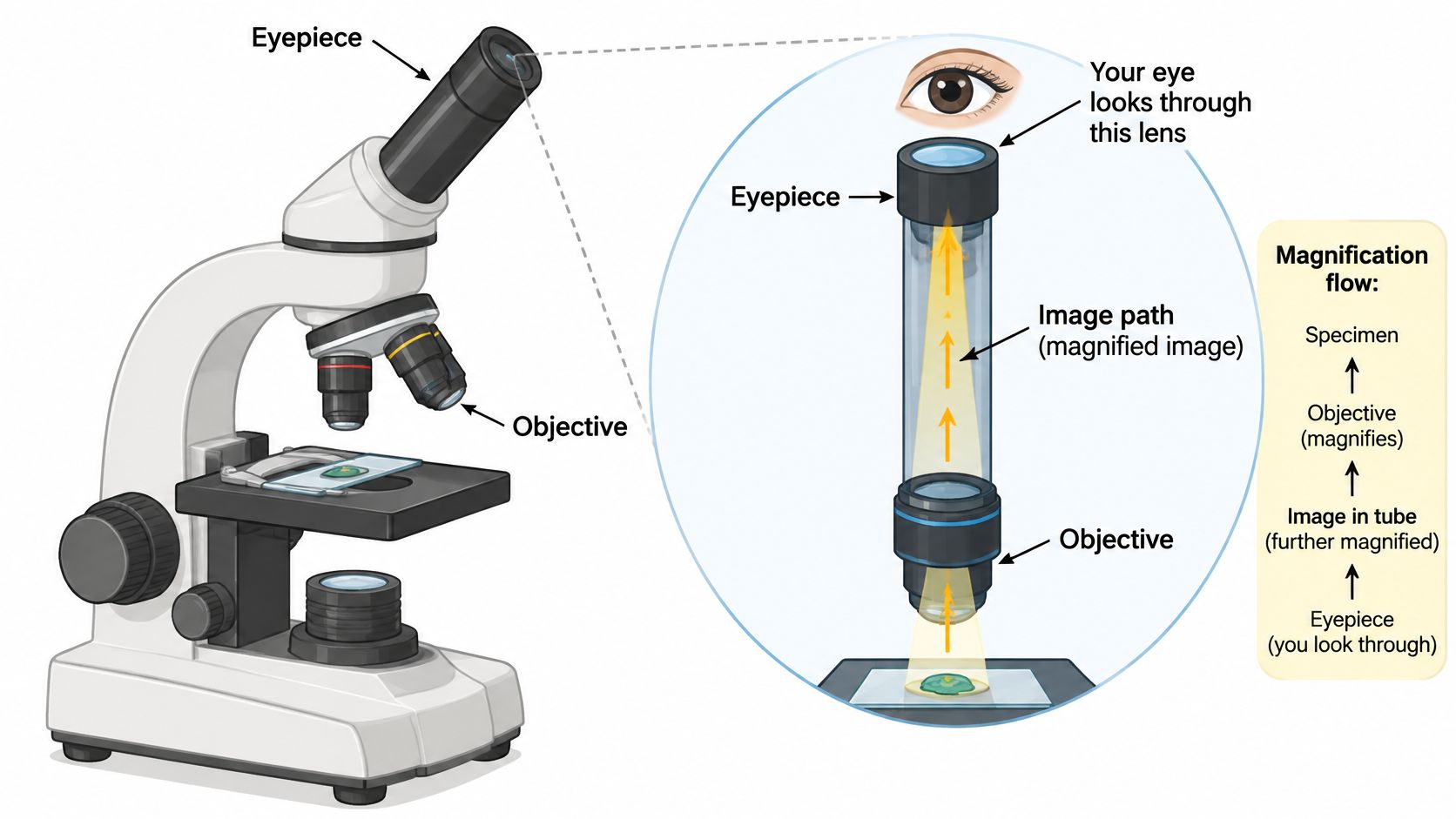
The eyepiece, also called the ocular, is the lens assembly the observer looks through. Total magnification is eyepiece magnification multiplied by objective magnification. That product describes enlargement; resolved detail comes from elsewhere in the system.
Contamination at the eyepiece announces itself in a specific way. A mark that stays fixed while the slide moves sits somewhere in the viewing path, while a mark that travels with the specimen is on the slide. One observation narrows the search, though it cannot prove which surface is dirty.
The head or body tube holds the designed spacing between the objective and the viewing system, and on some microscopes the path includes prisms or intermediate optics. A loose head or an eyepiece that is not fully seated produces symptoms that imitate lens failure. The mounting earns a check before any objective takes the blame.
The video provides another view of the instrument and its controls.
Between the head and the specimen sits the revolving nosepiece, which carries the objectives and brings the selected lens into the optical axis. A position that has not fully engaged can leave the field partly dark or uneven, so a tilted-looking view after an objective change calls for a seating check before refocusing.
The objective does the resolving work of the instrument. Its suitability depends on conditions engraved on the barrel: the immersion medium it expects, the cover-glass thickness it assumes, and the light it can accept. An objective used outside those conditions magnifies faithfully and resolves poorly.
When the image fails, work from cheap to invasive. First confirm the nosepiece clicked fully into position. Then reseat the eyepiece and confirm the head assembly is secure without dismantling the optical path. Only then inspect objective surfaces, following the manufacturer's cleaning procedure.
Lens cleaning is not a substitute for diagnosis. Unnecessary wiping adds handling without answering whether the problem is contamination, illumination, or a mismatch between the objective and the preparation.
How to Read Objective Markings
Two objectives can carry the same magnification figure and still produce very different images. The difference is written on the barrel. The engraving is a set of operating conditions, and the lens performs to specification only when those conditions are met. The physical order of markings varies between manufacturers, and some specifications appear in the objective documentation rather than on the barrel itself.
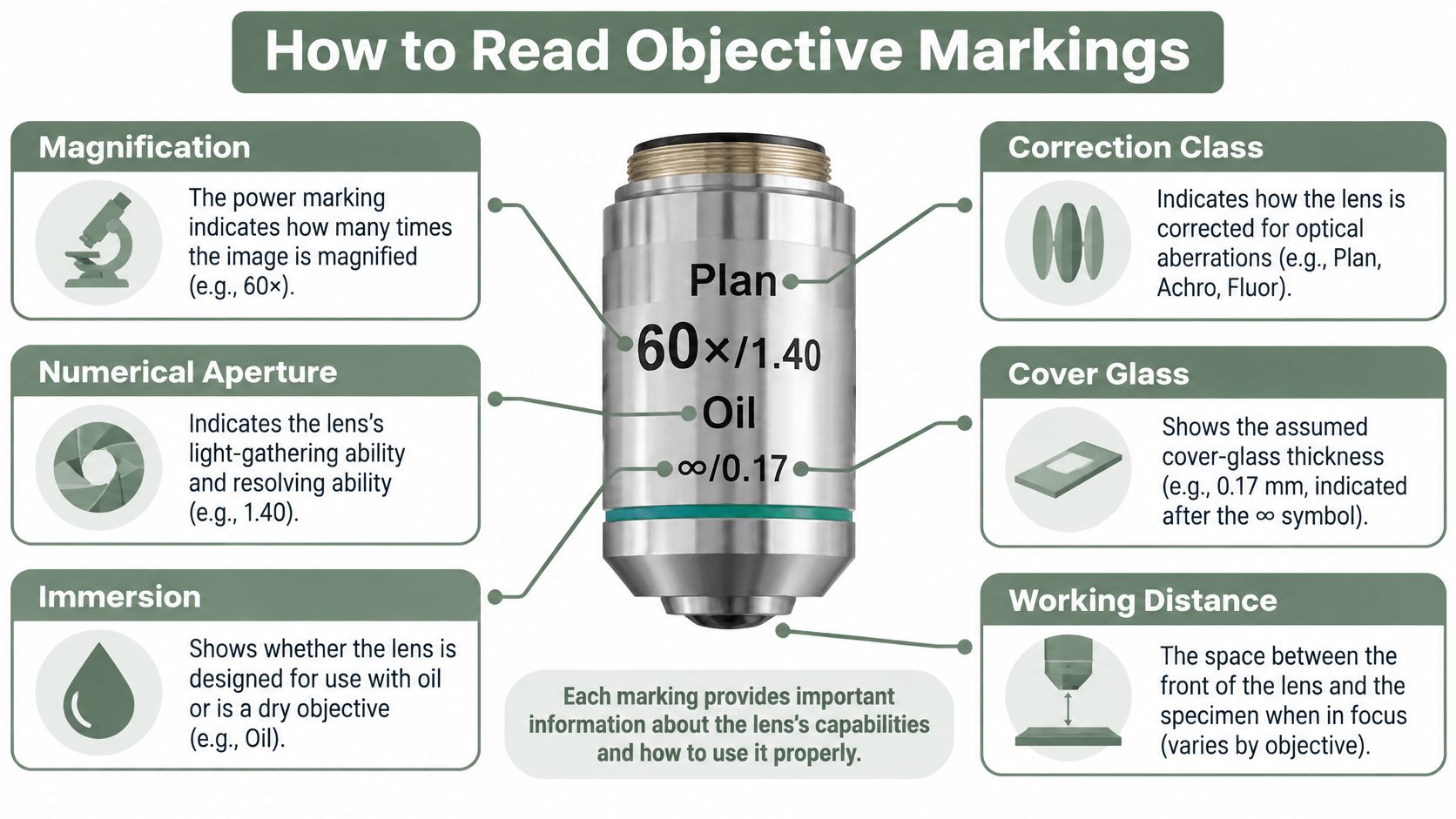
Read the barrel the way you would read a reagent label. Each marking names a condition, and each condition has a characteristic failure when it is ignored.
| Marking | What it specifies | Failure when ignored |
|---|---|---|
| Magnification figure | Image enlargement | A larger image with no additional detail |
| Numerical aperture (NA) | Light acceptance, resolving power, brightness | A dim image that cannot resolve fine structure |
| Immersion designation | Required medium between lens and specimen | The wrong medium for the design spoils the image |
| Cover-glass assumption | The coverslip arrangement the optics expect | Aberration that no amount of refocusing removes |
| Correction class and collar | Optical correction and its adjustment range | Residual aberration from a mismatched or mis-set design |
| Working distance | Space between the objective front and the specimen | Inability to reach focus on thick preparations |
Objective NA can range from roughly 0.1 at low magnification to about 1.4 for high-performance oil objectives, while standard immersion oil is designed around a refractive index near 1.518, as explained in Florida State University's guide to microscope objectives. The immersion designation carries as much weight as the power marking. Oil belongs with an objective designed for oil; applying it to a dry lens adds contamination without adding resolution.
Depth is the quiet assumption. High-NA objectives are often optimized for imaging near a coverslip, and in aqueous, coverslipped specimens, oil objectives typically lose their excellent imaging properties beyond approximately 10 micrometres of depth, as described in the objective reference linked above. When the feature of interest sits inside tissue rather than near the cover glass, a suitable water-immersion objective is often the better choice, subject to its actual design and working distance.
Match the objective's optical assumptions to the specimen; the largest magnification marking rarely decides that match.
Record what the barrel told you. A usable decision record identifies the objective, NA, immersion medium, cover-glass assumption, sample depth if known, and condenser state. Unknown depth should stay unknown in the notes rather than becoming an unsupported estimate.
Illumination Parts and Empty Magnification
A researcher swaps a 40× objective for a 100× oil lens and the image gets bigger. Nothing new appears. The blur got larger, and the cause usually sits in the illumination train rather than in the objective itself.
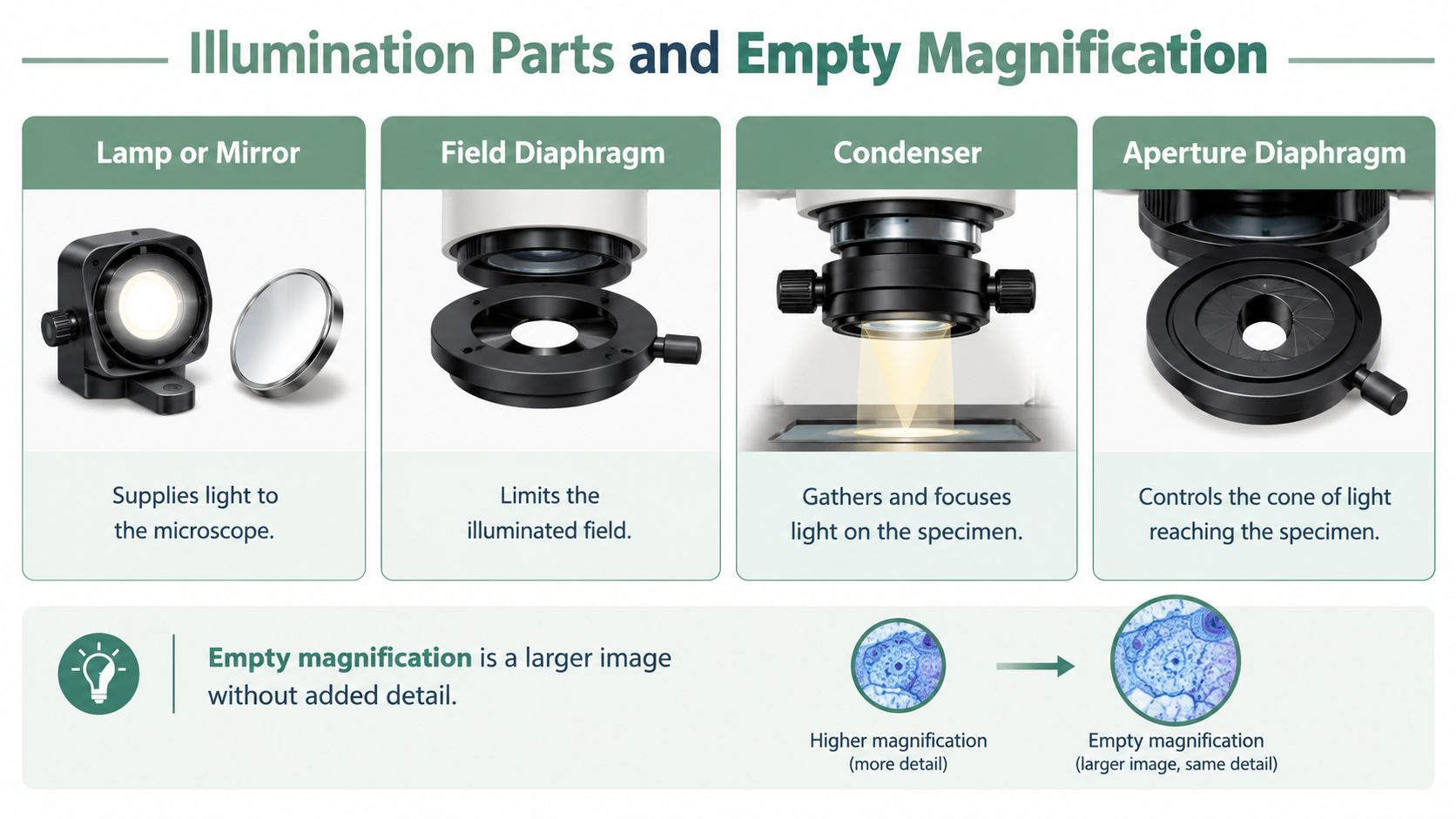
Each illumination part has one job, and each fails in a recognisable way. Reading them as a chain of jobs makes faults easier to place than reading them as names on a diagram.
| Part | Job it does | Failure it causes when wrong |
|---|---|---|
| Lamp or mirror | Supplies light to the illumination path | A weak, interrupted, or misdirected supply mimics an objective that cannot resolve |
| Field diaphragm | Limits the illuminated field | An oversized illuminated area adds stray light around the region of interest |
| Condenser | Gathers and directs light toward the specimen | A poorly positioned condenser starves the objective of its designed light cone |
| Aperture diaphragm | Controls the illumination cone | Used as a brightness knob, it trades contrast or resolution for intensity |
The condenser and aperture diaphragm set the light cone the objective works with. To obtain an objective's full NA, the condenser NA should equal or exceed the objective NA, and Köhler illumination must be correctly aligned. A dry objective is practically limited to an NA of about 0.95, whereas oil objectives commonly reach approximately 1.40; comparable oil designs can improve resolution by roughly 1.5× over air, according to Florida State University's numerical aperture reference.
Those gains assume the medium and optical arrangement match. The sample-depth limitation described under objective markings still applies.
Recognising empty magnification
Empty magnification is a larger image carrying no additional resolved detail. A mismatched 100× objective can deliver less usable information than a well-aligned 40× objective when the specimen, condenser, cover glass, or immersion medium is wrong, as discussed in the numerical aperture reference linked above.
Work through the chain in a fixed order. Read the objective's NA and immersion marking instead of trusting barrel length or remembered power. Confirm the medium in place matches the objective design. Check condenser position, centering, and aperture against the instrument's alignment procedure. Then compare the images for newly separated features rather than a merely larger outline.
A fully open aperture is not a universal final setting. The correct adjustment depends on the objective, specimen, and viewing method.
A field that becomes brighter but stays equally uninformative has failed the test. The remaining question is whether illumination still limits the image or whether the objective and specimen are mismatched.
Mechanical Parts That Hold the Sample
A specimen stays centered at low power, then wanders off the field the moment the fine focus starts turning. The objective gets blamed first. The slide is usually the moving part, because mechanical components decide whether the specimen stays where the optics need it.
The base carries the instrument's weight, and the arm or frame carries the head and optics. Both jobs look passive until something flexes: a frame that shifts under hand pressure puts the whole image in slow motion. Carry the instrument by its designated support points, since focus knobs and viewing heads are not handles.
Each part below owns one job and one characteristic failure:
| Part | Job | Failure when it is wrong |
|---|---|---|
| Stage | Supports the slide at a fixed height | A tilted or loose stage tips the specimen out of the focal plane |
| Stage clips | Pin the slide against the stage | A slide caught under one clip pivots during focusing |
| Mechanical stage | Moves the slide in controlled increments | Worn or loose gears produce drift and jerky travel |
| Coarse focus | Changes the specimen-to-objective gap in large steps | Near the cover glass it can drive the lens into the slide |
| Fine focus | Refines the chosen plane in small steps | Forcing it past its travel adds resistance, not focus |
| Condenser focus | Raises or lowers the condenser | Mistaken for specimen focus, it changes brightness while the blur stays |
Working distance turns that table into a rule of thumb. Coarse focus covers ground; fine focus finds the plane. When a high-power objective sits close to the cover glass, coarse movement is the wrong tool because one large step risks contact. A soft image right after rotating the nosepiece usually calls for gentle fine focus before anyone suspects an optical defect, and unexpected resistance in any control means stop rather than push.
Standard clips do not fit every specimen. Odd-shaped samples, multi-well plates, and custom holders sometimes need purpose-built positioning aids, and American Additive Manufacturing's resource on 3D printed jigs and fixtures explains how such aids are designed. Whatever the holder, check it on the bench for clearance under the objective, stability through stage travel, and compatibility with the restraint system.
Mechanical faults also deserve written follow-through. Stiffness that returns after cleaning, gears that slip, or a stage that creeps between sessions belongs in a record, and an equipment maintenance log template provides fields for the symptom, the control involved, the action taken, and the follow-up status.
None of these parts adds resolution. They hold a good optical setup in place long enough to use it.
Cross References When the Image Fails
A symptom should direct attention to a likely component without becoming a diagnosis by itself. Several faults can produce similar views, so the first check should narrow the possibilities rather than establish certainty prematurely.
Route the symptom to its owner
- Dim or uneven field: Return to illumination parts, especially the condenser and aperture arrangement. Also check that the objective is fully seated.
- Detail lost only at higher power: Return to objective markings. Check the medium, cover-glass assumptions, and sample depth, then compare the condenser setup.
- Spots that stay put as the slide moves: Return to the eyepiece and objective checks. Stationary marks suggest the viewing path deserves inspection, but don't identify a particular dirty surface.
- Field jumps after nosepiece rotation: Return to nosepiece seating before changing focus repeatedly. A persistent problem warrants equipment assessment.
- Slide won't stay under the lens: Return to the stage clips or mechanical stage. Optical adjustments won't secure a loose slide.
- Focus becomes difficult near the cover glass: Return to working distance and the distinction between coarse and fine focus.
These routes connect related controls without merging their jobs. The objective check leads to the condenser because the pair must work together. The focus check leads to working distance because a safe adjustment depends on available clearance.
A worked troubleshooting pass
Consider an illustrative high-power attempt that produces a muddy field after a clear lower-power view. The scientist first checks the nosepiece entry and confirms that the objective is fully engaged.
Next comes the objective-markings entry. The scientist compares the objective's immersion designation with the medium present and checks whether the intended sample plane suits that lens.
The final pass uses the illumination entry to review condenser alignment and aperture. Each check changes or verifies a specific condition, and the resulting image is compared with the previous view.
Diagnostic discipline: Changing several controls at once may improve the image while obscuring which change mattered.
If the same fault persists with a suitable preparation and verified setup, the problem should move beyond casual adjustment. A documented laboratory equipment test can help separate a reproducible instrument issue from a specimen-specific observation.
The record should preserve unsuccessful checks too. Otherwise, the next operator may repeat them without knowing what was already tested.
Quick Reference for Microscope Parts
The table below is a memory aid for use beside the instrument. Its purpose is to identify the next useful check, not to replace the limits and compatibility conditions described in the detailed entries.
Microscope Parts at a Glance
| Part | Group | Main job | First check |
|---|---|---|---|
| Eyepiece | Optical | Enlarges the objective image for viewing | Cleanliness and correct seating |
| Objective | Optical | Forms the primary specimen image | Medium and specimen compatibility |
| Nosepiece | Mechanical | Selects and aligns an objective | Full engagement in the selected position |
| Head or body tube | Mechanical and optical housing | Maintains the designed viewing path | Secure seating and compatible components |
| Condenser | Illumination | Directs light toward the specimen | Position, centering, and objective match |
| Aperture diaphragm | Illumination | Controls the illumination cone | Setting appropriate to the objective |
| Field diaphragm | Illumination | Limits the illuminated field | Alignment according to the instrument procedure |
| Light source | Illumination | Supplies illumination | Light output and unobstructed path |
| Stage and holder | Mechanical | Support and position the slide | Secure restraint and controlled movement |
| Coarse focus | Mechanical | Finds approximate focus at low power | Safe clearance before movement |
| Fine focus | Mechanical | Refines the specimen plane | Small adjustment without approaching contact |
| Arm and base | Mechanical | Support the instrument | Stable placement and secure structure |
Routine starting checklist
- Inspect the optics: Address visible contamination using the approved cleaning procedure.
- Begin at low power: Locate and center the region of interest before increasing enlargement.
- Secure the specimen: Confirm that the slide remains held during controlled movement.
- Match the preparation: Check cover-glass and immersion assumptions against the objective.
- Set the illumination: Adjust the condenser for the selected objective.
- Judge added detail: Continue to higher magnification only when the additional information is useful.
An oil objective, for example, belongs in the optical group. Its first check is the immersion arrangement and specimen compatibility, not whether the lamp is bright enough.
The depth caution under objective markings remains relevant even when every mechanical control works normally. A compact table can't express all such limits.
A suitable next step is to preserve the completed checklist alongside the image. That turns a temporary instrument setup into context another scientist can evaluate later.
How to Record the Setup You Actually Used
A micrograph labeled only with magnification leaves important questions unanswered. The record needs to distinguish the intended setup from the conditions present when the image was obtained.
Memory, paper, and contemporaneous capture
Reconstruction from memory creates no immediate writing burden, but it leaves uncertainty about small changes. It may suffice for a casual orientation exercise, not for a defensible account of a troubleshooting sequence.
Protocol-margin notes suit a scientist who already works from paper. They can preserve an objective change or condenser adjustment immediately, provided the notes remain connected to the corresponding image.
Contemporaneous capture keeps the observation close to the event. Typed notes, voice notes, images, and timers offer different ways to document work without pretending that a photograph alone explains the setup.
A structured lab notebook page helps keep the specimen identity, instrument conditions, and observation together. The format matters less than preserving the connection between the claim and its source.
A reusable microscopy observation record
- Objective: Record the identity, magnification, and NA.
- Immersion medium: Name what was used, including uncertainty.
- Cover glass: Record the known preparation and the objective's assumption.
- Condenser: Describe the setting or alignment state sufficiently for later review.
- Sample depth: Record it when known; otherwise state that it wasn't established.
- Observed image: Describe visible detail, unevenness, haze, or unresolved features.
- Changes and evidence: Connect adjustments to the relevant images and note whether they helped.
Verbex is a private, on-device lab documentation app for iPhone and iPad that supports voice notes, typed notes, timers, and images. Source notes retain context and timestamps for scientist review; it isn't a microscope or an official ELN.
A useful illustrative note separates observation from explanation: the field remained hazy after an illumination adjustment, while the cause remained uncertain. That is stronger documentation than recording an unverified diagnosis as fact.
Contemporaneous notes don't make an interpretation correct. They preserve what happened closely enough for the scientist to reconsider it.
A Practical Next Step After the Bench
The next microscopy session should leave both an image and a record of the conditions that produced it. The scientist can begin with a selected record section, capture the objective and illumination setup, then add observations whenever a meaningful adjustment changes the view.
Preserve the evidence before polishing the record
A short source note doesn't need to sound like a finished methods paragraph. It needs to distinguish the original condition, the adjustment, the observed result, and any unresolved uncertainty.
For hands-occupied work, voice capture can preserve a brief observation. Typed notes suit details that are easier to inspect and enter deliberately, while images can document the field or objective barrel. Timers can accompany time-sensitive procedures without implying that every microscopy session needs timed steps.
The capture app organizes information into sections the scientist selects. It doesn't independently decide the scientific meaning of a note, identify the cause of a poor image, or validate an interpretation.
Review before export
Review & Complete creates a source-backed Organized draft for human review. The scientist checks and edits the record before completion, retaining responsibility for what the final account says.
Completed records can be exported as PDF, DOCX, or Markdown for an existing documentation workflow. Export doesn't imply automatic ELN synchronization, and the app doesn't replace an official electronic lab notebook or validated system.
- Scientific boundary: The app doesn't align a condenser, interpret a micrograph, or make autonomous scientific decisions.
- Privacy boundary: Processing stays on device, with no account and no cloud AI.
- Documentation boundary: The reviewed record supports a clearer account of bench work, not a guarantee of reproducibility or compliance.
The practical next step is Verbex for iPhone and iPad, free to download. Its role is to capture what changed while the instrument setup and observation are still available, then support review before the record enters the laboratory's established workflow.
Verbex offers private, on-device capture of microscopy notes, images, and setup changes for a scientist-reviewed record. For a next session that preserves more than magnification alone, scientists can visit Verbal Experiment or Verbex and prepare to record the objective, medium, condenser state, and actual observation together.